On this page
- Which WhatsApp do you have?
- Personal WhatsApp: what you can actually do
- WhatsApp Business app: greeting, away and quick replies
- WhatsApp Business API: auto replies that read and decide
- The rule that decides what an auto reply can contain
- Twelve auto reply examples by business type
- Mistakes that cost replies, or the number
- What VGraple CRM does here
Too long? Read this
- Personal WhatsApp has no built-in auto reply; the honest options are the free WhatsApp Business app or, on Android, a third-party responder with the trade-offs listed below
- The WhatsApp Business app gives you a greeting message, an away message and quick replies; each is set under Business tools and works on one phone
- The WhatsApp Business API adds keyword rules, chatbot flows, AI answers and team handoff, with Meta's 24-hour window and template rules deciding what can be sent when
- A comparison table, 12 industry-specific auto reply examples, the mistakes that get numbers restricted, and 12 FAQs
An auto reply on WhatsApp is a message sent without a person typing it: a greeting when someone messages you for the first time, an away message outside business hours, or a full conversation handled by a chatbot. Personal WhatsApp has no auto reply at all. The free WhatsApp Business app has three fixed ones. The WhatsApp Business API, through a platform like VGraple CRM, can reply to anything, ask questions, look up information and hand the chat to a person. This guide covers all three, in that order, with the exact steps, the limits Meta sets, and examples for the businesses that ask us most often.
Which WhatsApp do you have?
Everything below depends on which of the three WhatsApps your number is on.
| Personal WhatsApp | WhatsApp Business app | WhatsApp Business API | |
|---|---|---|---|
| Cost | Free | Free | Platform fee (VGraple CRM has a free plan) plus Meta's per-message rate for templates |
| Built-in auto reply | None | Greeting, away message, quick replies | Anything you build: keyword rules, flows, AI |
| Runs when the phone is off | No | No | Yes, on the server |
| Answers questions | No | No (fixed text) | Yes |
| Buttons and lists | No | No | Yes |
| Multiple people replying | No | One phone, or 4 linked devices | Unlimited agents in a shared inbox |
| Broadcasts | Broadcast lists to saved contacts | Broadcast lists, 256 recipients | Template broadcasts to opted-in contacts, no cap beyond Meta tiers |
| Keep the phone app too | n/a | Yes | Yes, with coexistence mode |
If you are a solo operator who answers within minutes anyway, the Business app is enough. If enquiries arrive while you are with a customer, at night, or faster than one person can handle, you need the API.
Personal WhatsApp: what you can actually do
Personal WhatsApp has no auto reply feature and Meta has never added one. People search for it constantly, so here is the honest list.
Move the number to WhatsApp Business (recommended). The Business app is free, uses the same number, keeps your chats, and adds greeting and away messages. Install WhatsApp Business, choose "use the number from personal WhatsApp", and follow the migration. Your contacts see a "Business account" label and nothing else changes for them.
Android: notification-reading responder apps. Apps such as auto-responder tools read incoming WhatsApp notifications and reply through the notification's reply action. They work on personal WhatsApp, but they depend on notifications being on and the phone awake, they cannot see messages you have already opened, they sometimes double-reply, and you are giving a third-party app access to every notification on the phone. Use one only for a short absence.
iPhone: nothing reliable. iOS does not let apps reply through notifications on your behalf. Shortcuts automations can open WhatsApp but cannot send a reply to an arbitrary incoming message. Move to the Business app instead.
Status as a workaround. Some people post "Away till Monday, reply after that" on Status. It reaches only people who look, and it is not a reply.
WhatsApp Business app: greeting, away and quick replies
All three live under Business tools: open WhatsApp Business, tap the three-dot menu (Android) or Settings (iPhone), then Business tools.
Greeting message
- Business tools, Greeting message, turn on Send greeting message.
- Tap the message and write it. Keep it under 3 lines: who you are, what you do, what to reply with.
- Under Recipients, choose Everyone, Everyone not in address book, Everyone except (a list) or Only send to (a list).
- Save.
It fires when a person messages you for the first time, or again after 14 days with no messages. It does not fire on chats you start.
Example
Salon: "Hi, this is Aster Beauty Studio in Satellite. Reply 1 for prices, 2 to book, or tell us what you need. We reply between 10 am and 8 pm."
Away message
- Business tools, Away message, turn on Send away message.
- Write the message.
- Under Schedule, choose Always send, Custom schedule (a date range, for holidays) or Outside of business hours (set your hours under Business profile first).
- Choose recipients as above, then save.
It sends once per chat per 24 hours while the schedule is active. If a customer messages three times at night they get it once.
Example
Clinic: "Thanks for messaging Dr Mehta's Clinic. We are closed now and open at 9 am. For emergencies call 108. We will reply first thing in the morning."
Quick replies
Quick replies are not automatic; they are saved answers you insert by typing "/" in the chat. Business tools, Quick replies, add up to 50 with a shortcut each. They are the fastest way to answer the same five questions all day without automation.
What the Business app cannot do
It cannot branch on what the customer wrote, cannot send buttons, cannot reply when the phone is off, cannot let two staff reply from their own phones without linking devices, and cannot tell you which auto replies led to a sale. When any of these matters, the API is the next step, and with coexistence you do not have to give the app up.
WhatsApp Business API: auto replies that read and decide
On the API, "auto reply" means whatever you build. VGraple CRM gives you three layers that stack.
Layer 1: keyword and event rules
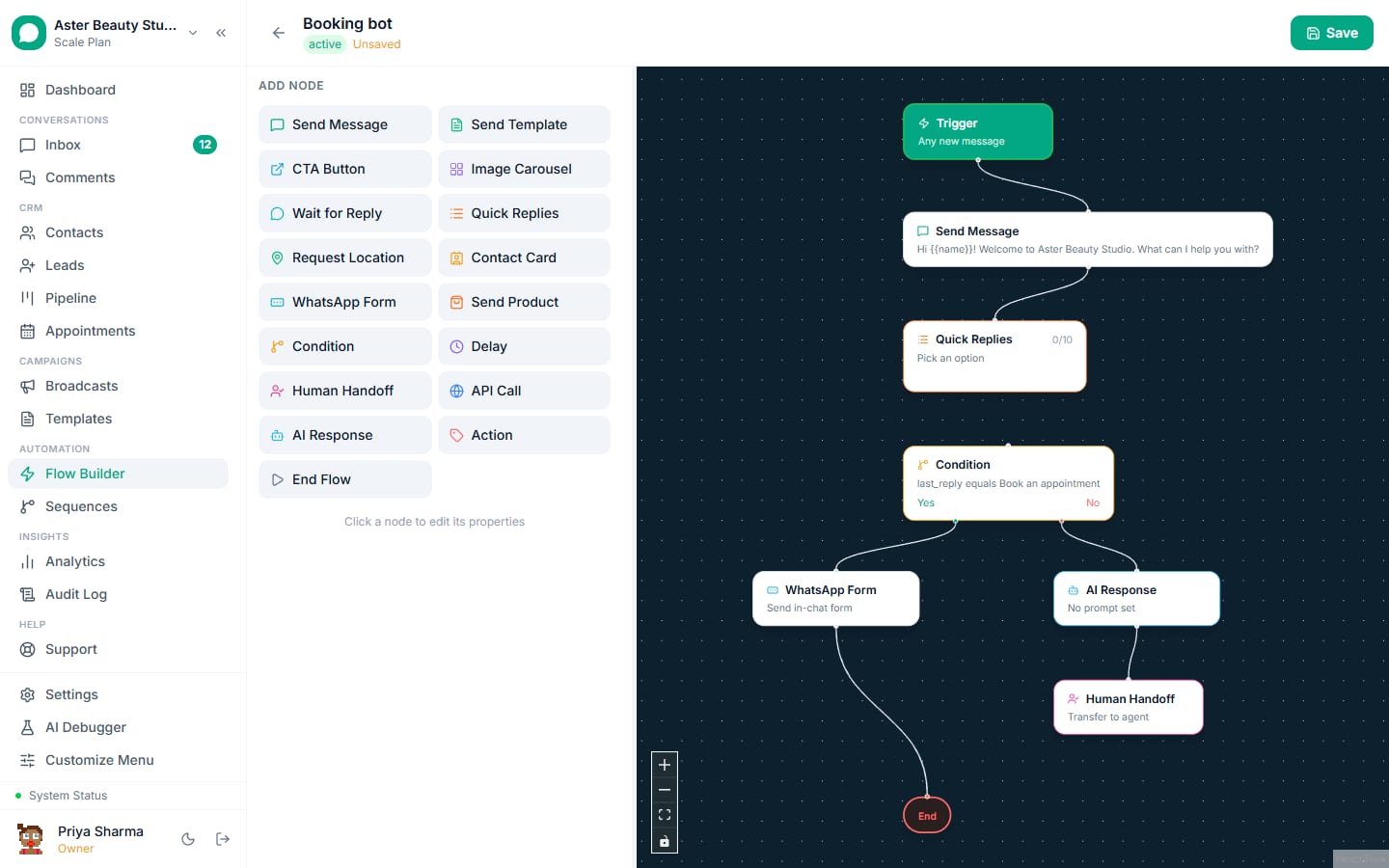
A flow trigger matches an event (a keyword, any first message, a form submission, a new lead) and the flow does something: send a message, send a template, add a tag, assign an agent, start a sequence. This is the API version of the greeting message, except it can send different answers to "price", "timing" and "address", and it can send buttons.
Example
Coaching institute: message contains "fees" -> send the fee sheet as a document with a "Book a counselling call" button, tag the contact "fee-enquiry", assign to the admissions agent.
Layer 2: chatbot flows
A flow is a conversation you draw: a trigger, questions, branches on the answer, delays, a handoff to a human. It is what people mean by a WhatsApp chatbot. Typical first flows: qualify a lead in three questions, book an appointment, answer the ten questions that make up 80 percent of enquiries, collect an order.
Layer 3: AI chatbot
An AI chatbot answers from a knowledge base you upload (price list, FAQs, policies, brochure) instead of a script. It handles questions you did not anticipate, waits for a customer to finish typing before replying, escalates on rules you set (a word like "refund", a low-confidence answer, a request for a human) and pauses itself the moment a person replies in the thread.
How to set up an API auto reply in VGraple CRM
- Connect your number. Settings, Channels, WhatsApp, Connect via Embedded Signup, or Connect in coexistence mode to keep the phone app. New numbers take about 15 minutes; see connect your WhatsApp number.
- Create the reply. For a fixed greeting: Settings, Automation, Lead Rules, Create First Rule, trigger "any inbound message from a new contact", action "send message". For a menu: Flow Builder, New Flow, trigger keyword, add a Send Message node with reply buttons and one branch per button. For AI: Settings, AI and Flows, add a knowledge base, turn on AI responses for the WhatsApp channel.
- Test it from your own phone. Message the connected number with the trigger word. The reply should arrive within a second or two; the AI Debugger shows each decision if it does not.
- Set the handoff. Every flow ends either in a resolved conversation or an assignment to an agent. Replies land in the shared inbox with the flow's context attached.
- Switch the phone-app greeting off if you connected in coexistence mode and the two would overlap; keep the app's away message if you want it for the hours the API is deliberately quiet.
The rule that decides what an auto reply can contain
In practice: instant replies to inbound messages are always allowed and cost at most the utility rate. Scheduled follow-ups after 24 hours must be templates, which is why VGraple CRM's sequences are built from templates and why the template library exists.
Twelve auto reply examples by business type
Copy these into the Business app (as text) or into a rule or flow node (with buttons where noted).
- Salon: "Hi {{name}}, welcome to Aster Beauty Studio. Reply BOOK to see this week's slots, PRICE for our price list, or tell us what you need." Buttons: Book, Prices, Talk to us.
- Dental clinic: "Thanks for contacting Smile Dental. Are you an existing patient? Reply YES for appointments and reports, NEW for a first consultation."
- Real estate: "Thanks for your interest in Skyline Residency. Which configuration are you looking at? 2 BHK, 3 BHK or Villas." Buttons per option, then site-visit booking.
- Coaching institute: "Hi, this is Apex Academy. Reply 1 for JEE batches, 2 for NEET, 3 for fee details. Our counsellor is available 10 am to 7 pm."
- D2C store: "Hi {{name}}, thanks for messaging Kavya Apparel. Track an order (reply ORDER and your order number), ask about sizing (SIZE) or returns (RETURN)."
- Restaurant: "Welcome to Saffron Kitchen. Reply MENU for today's menu, TABLE to reserve, or DELIVERY to order."
- Travel agent: "Thanks for messaging Horizon Travels. Tell us where and when, and how many travellers, and we will send options within the hour."
- Gym: "Hi, FitZone here. Reply TRIAL for a free trial day, PLANS for membership plans, or CLASS for the timetable."
- Tuition centre: "Welcome to Bright Minds. Which class is the student in? Reply the class number and the subject and we will share batch timings."
- Clinic, after hours: "We are closed and reopen at 9 am. This is an automated reply; for emergencies call 108. Leave your name and concern and we will respond first thing."
- Jewellery store: "Thanks for messaging Aurum Jewels. Reply CATALOGUE for the latest collection, PRICE with a product code, or VISIT to book an appointment."
- Any business, holiday: "We are closed for Diwali from 31 October to 3 November. Orders placed now ship on 4 November. We will reply when we are back."
Use the customer's name only when you have it (the API knows it from the contact record; the Business app does not insert names).
Mistakes that cost replies, or the number
- Replying to every message with the same greeting. The Business app's greeting fires only on first contact; a keyword rule that fires on any message becomes noise. Fire greetings on new contacts only.
- Auto replies that dead-end. Every auto reply should tell the customer what to do next: reply with a word, tap a button, or expect a person by a time.
- Automating outbound marketing without opt-in. Auto replies to inbound messages are safe; automated promotional messages to people who did not opt in draw blocks and spam reports, which lower your quality rating and messaging limits. See why broadcasts get blocked.
- Forgetting the 24-hour window. A "we will get back to you" that fires two days later as free-form text will fail; it must be a template.
- No human path. Customers who cannot reach a person leave. On the API, put "Talk to a person" on every menu and route it to the inbox.
- Testing only on your own contact. Test from a number that is not in your address book too; the Business app's recipient filters and the API's "new contact" triggers behave differently for saved contacts.
What VGraple CRM does here
Keyword rules, chatbot flows and the AI chatbot are on every plan including the free one. Replies land in a shared inbox with the automation context, the AI pauses when a person replies, and coexistence mode lets you keep the WhatsApp Business app on the phone while the API answers around it. Templates for the follow-ups that fall outside the 24-hour window come from the template library, and delivery protection keeps automated sending inside Meta's limits.