On this page
In short
- A lead rule runs once, the instant a new lead is created, and checks up to 5 conditions against that lead
- First matching rule wins: rules run in a set order and only the first one whose conditions all match assigns the lead
- Rules assign; flows message. A flow with the New lead arrives trigger sends the template, adds tags and starts a sequence
Lead rules are the routing layer that decides who owns a new lead the instant it lands in VGraple CRM, before anyone on your team has looked at it. A rule checks a small set of conditions (where the lead came from, which campaign, which form, which pipeline, which chat widget) and, if it matches, assigns the lead to a team member. Talking to the lead is the Flow Builder's job: a flow with the New lead arrives trigger sends the template, adds the tag and starts the sequence, with the lead's fields as variables and every run on record.
What you get
- Rules that run automatically the moment a new lead is created, with no manual trigger
- Up to 5 conditions per rule, combined with AND logic (all must match)
- Eight selectable lead sources: Meta Lead Ad, Click to WhatsApp ad, Web Form, WhatsApp Form, Chatbot, Comment Rule, API, Manual
- Condition fields for campaign name, form name, pipeline, label and chatbot widget, each with equals or contains matching where relevant
- One action per rule, assign to a team member, with the contact following the lead's owner when it had none
- First-match-wins evaluation in a reorderable priority list, so specific rules can sit above catch-all ones
- The same conditions in the Flow Builder's New lead arrives trigger, so routing and messaging agree on which lead is which
How it works
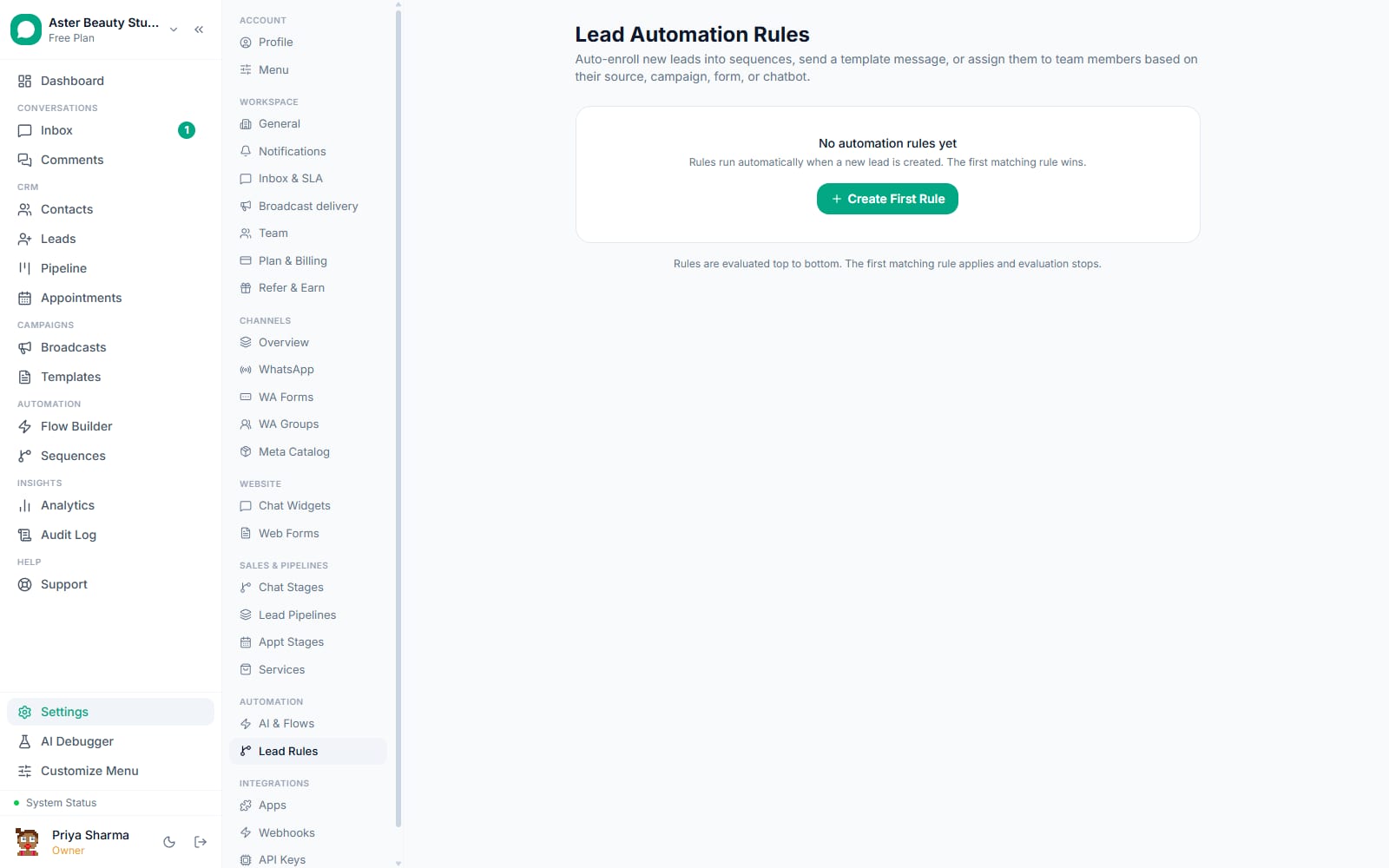
- Open Lead Rules and create a rule. From Settings, the Lead Rules page lists every rule in the order it runs, with a plain-English summary of its conditions (for example, "Source is Meta Lead Ad" or "Campaign name contains Diwali") and the team member it assigns to.
Add conditions. Pick a field (Source, Campaign name, Form name, Pipeline, Label, Chatbot), an operator where one applies (equals or contains), and a value. Add up to 5 conditions; a rule only matches when every one of them is true for the lead being evaluated.
Choose the team member. The lead gets this owner, and so does its contact when nobody owned it yet, so the chat and the lead show the same person.
Set the order. Rules evaluate top to bottom; drag a rule to reorder it. Put your most specific rules (a particular campaign or form) above general ones (any Meta Lead Ad) so the specific rule gets first pick. A rule with no conditions at the bottom catches everything else.
A new lead arrives and the first matching rule assigns it. The instant a lead is created, whether from a Facebook Lead Ad, a website form, a chatbot conversation, a comment-to-DM capture, an ad that opened a chat, the API or a colleague adding it by hand, every active rule is checked in order, and the first one whose conditions all match assigns the lead. No later rule is evaluated for that lead.
Let a flow do the talking. In the Flow Builder, a flow with the New lead arrives trigger starts for the same lead, with the same conditions available, and sends the template, adds a tag or starts a sequence. The lead's fields are its variables.
What lead sources and conditions can a rule check?
The Source condition covers eight values: Meta Lead Ad, Click to WhatsApp ad, Web Form, WhatsApp Form, Chatbot, Comment Rule, API, and Manual. Every condition besides Source, Pipeline and Chatbot (which are exact-select dropdowns) supports "equals" or "contains" matching, so a Campaign name condition set to "contains Diwali" catches every ad whose campaign name includes that word without listing each one individually. Combine conditions to narrow a rule to one ad, one form or one widget.
Example
A D2C store runs two Meta Lead Ad campaigns at once, a discount offer and a new-arrivals teaser. Two rules, each matching on Campaign name, send each campaign's leads to the salesperson who owns that line. Two flows with the New lead arrives trigger, matching the same campaign names, send a different welcome template and start a different sequence for each.
How does per-chatbot scoping work?
If your workspace runs more than one chat widget, each with its own knowledge base and purpose (a sales widget on the homepage, a support widget on a help center page), the Chatbot condition lets a rule match leads from one specific widget only. The New lead arrives trigger has the same Chat widget filter, so a flow can be scoped the same way.
Example
A SaaS company's pricing-page chat widget captures high-intent leads; a rule scoped to that widget alone assigns them directly to a senior salesperson instead of the general queue every other chatbot lead goes into.
How does first-match-wins evaluation work?
Rules are checked in the order shown on the Lead Rules page, and the moment one rule's conditions all match, it assigns the lead and evaluation stops for that lead entirely; no other rule is checked. This means a catch-all rule with no conditions (matching every lead) should always sit at the bottom, where it catches whatever the specific rules above it did not.
Example
A real-estate agency has three rules: one for a specific campaign, one for any Meta Lead Ad, and a catch-all at the bottom for everything else. A lead from the specific campaign matches the first rule and stops there, never reaching the general Meta Lead Ad rule below it.
With VGraple CRM vs manually triaging new leads
| Manual triage | Lead rules and flows | |
|---|---|---|
| Assigning a new lead to the right person | Someone checks the queue and assigns it | Assigned instantly by the first matching rule |
| Sending an instant acknowledgment | Whenever an agent gets to it | A New lead arrives flow sends the template the moment the lead is created |
| Starting the right follow-up sequence | Manual Enroll Leads action, per lead | The flow's Enroll in sequence step, per matching lead |
| Routing leads from different chat widgets differently | Manual sorting by widget | Chatbot condition scopes the rule and the flow |
| Consistency across shifts and holidays | Depends on who's on duty | Runs the same way 24/7, no staffing required |
| Auditing what happened to a lead | Ask whoever handled it | The assignee is on the lead; every flow run is listed on the flow |
Who uses it
D2C stores send each Meta Lead Ad campaign's leads to the person who owns that product line, while a flow sends the product-specific welcome before the shopper has closed the ad. See WhatsApp automation for ecommerce.
Real-estate agencies assign leads from a specific project campaign to the agent handling that project, automatically, from the moment the lead ad fires. See WhatsApp automation for real estate.
Coaching institutes scope rules to individual chat widgets running on different course landing pages, so a lead from the "IELTS prep" widget goes to the IELTS counsellor and a lead from the "Study abroad" widget to a different one. See WhatsApp automation for education and coaching.
Clinics route new-patient and follow-up intake forms to different desks with a form-name condition, and let a flow send the matching acknowledgment template. See WhatsApp automation for healthcare.
What Meta allows
Because a flow's sends go through the same tracked path as every other outbound message on the platform, opt-out enforcement, template pause detection and quality-rating pacing all apply automatically; a flow cannot bypass any of the protections described on the delivery protection page.
Plans and limits
Lead rules are on every plan, including Free. There is no cap on the number of rules or on how many leads they process; a rule can hold up to 5 conditions.