On this page
In short
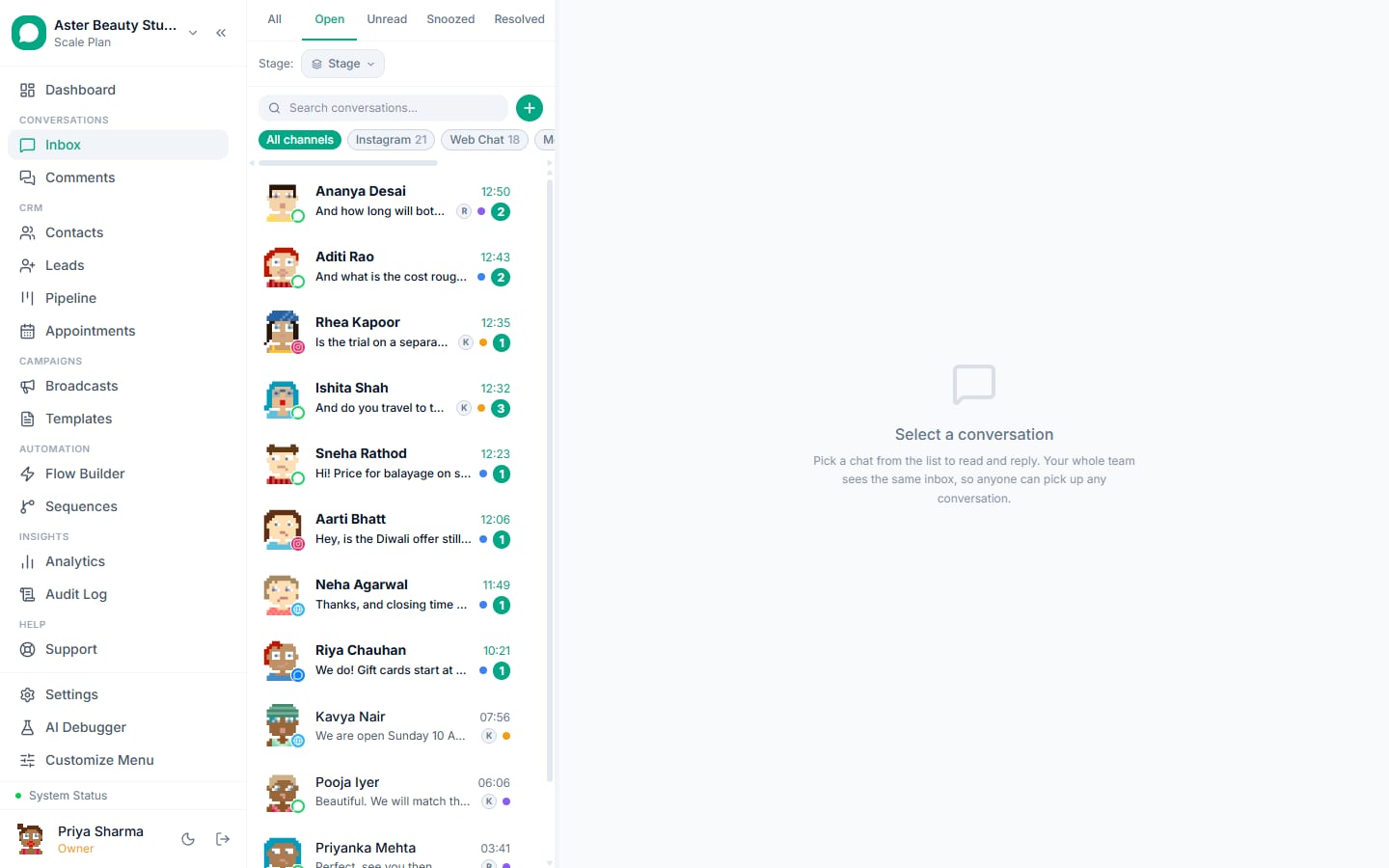
- A shared inbox with assignment rules, first-response SLAs, stages, collision detection and CSAT
- AI replies and suggestions from a knowledge base; flows for order and account lookups; escalation to a person
- WhatsApp, Instagram, Messenger, comments and the website widget in one queue, on the web and the Android app
Customer support teams use WhatsApp because customers already do, and because replies inside the 24-hour window need no template and cost at most the utility rate. VGraple CRM turns the number into a support desk: a shared inbox with assignment rules, SLAs, stages and CSAT, AI that answers routine questions and drafts the rest, flows for order and account lookups, and Instagram, Messenger, comments and the website widget in the same queue; the outcome is faster first responses, fewer tickets and a team that can see its own numbers.
The problem in numbers
Support on WhatsApp breaks when it is a phone passed around: no assignment, no history, two people answering the same customer, questions missed at shift change, and no way to know how fast anyone replied. The economics are on the team's side (a reply within 24 hours needs no template and costs Rs 0.115 at most; a reply a day late needs a template) if the tooling turns the number into a queue with owners, targets and records. Routine questions (order status, hours, policies) are the volume, and they are exactly what a flow or a grounded AI answers without a person.
Six things customer support teams automate on WhatsApp
1. A queue with owners
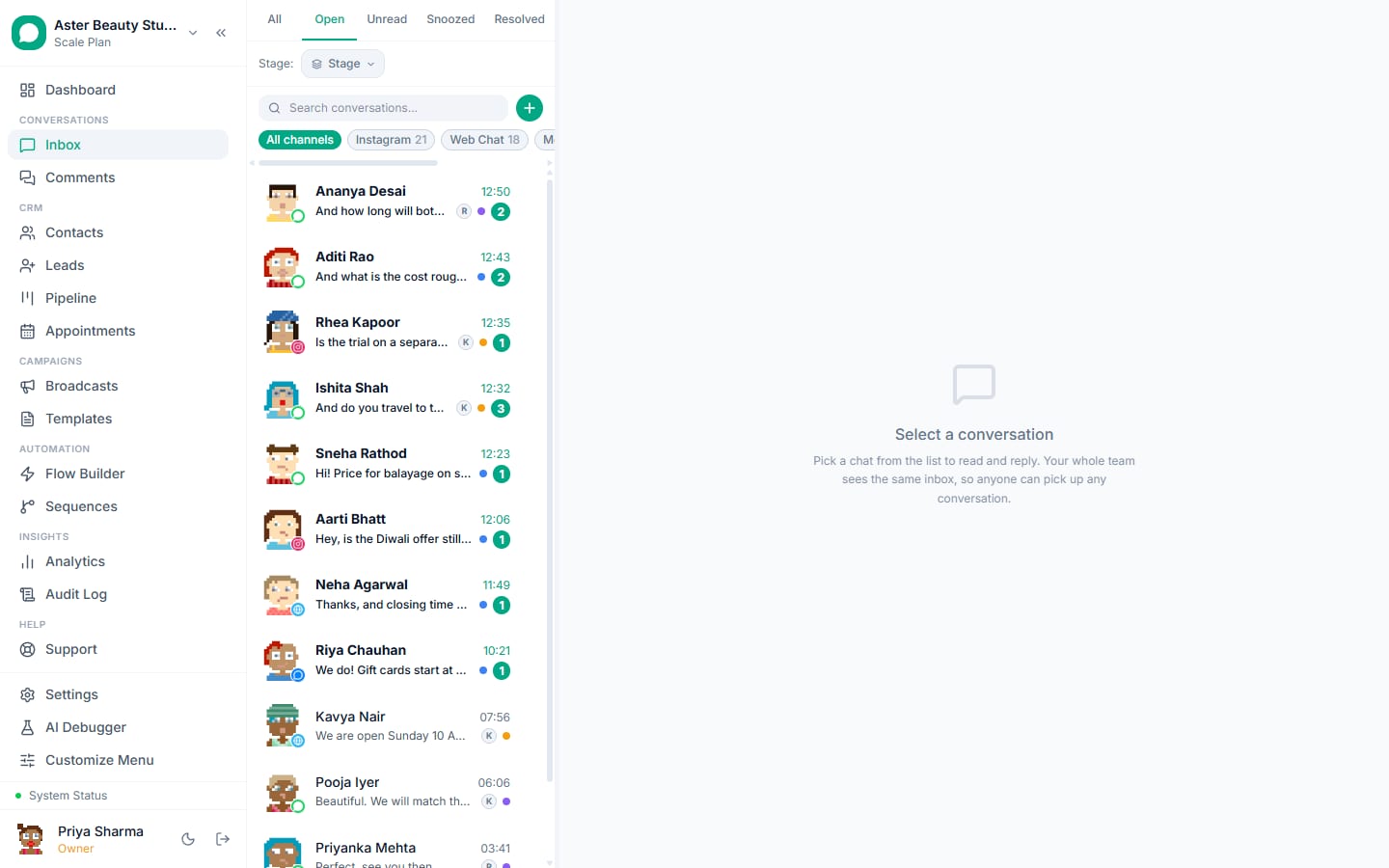
New conversations are assigned by rule: round-robin within a team, by channel, by source, or by the customer's choice in a flow; collision indicators show who is typing; internal notes and mentions hand questions to colleagues without reassigning.
sup_assigned (session reply)
Hi {{1}}, {{2}} here from {{3}} support. I have your details; let me look into it and reply in a few minutes.
Team inbox with assignment rules; assignment guide.
2. SLAs and stages
First-response targets per team with business hours, countdown timers, warnings before breach and alerts after; stages (new, waiting on customer, resolved) keep the working tabs honest; CSAT fires on resolve.
sup_csat (session reply)
Thanks for contacting {{1}}, {{2}}. How did we do today? Tap a button below.
SLA guide; stages under tags, notes and stages.
3. Routine questions answered by the AI
Hours, policies, how-tos and order status from a knowledge base of your pages and FAQs; escalation rules for complaints, refunds and sensitive topics; the bot pauses when a person joins.
sup_ai_intro (session reply)
Hi {{1}}, I can help with orders, policies and timings at {{2}}. Reply AGENT any time to reach a person.
AI chatbot with escalation and takeover pause.
4. Lookups in chat
A Track or My account button asks the reference and reads the status through a webhook to your system; the reply is a session message, drawing on the number's 1,000 free replies a month.
sup_order_status (session reply)
Order {{1}} is {{2}}. Expected delivery {{3}}. Reply if anything looks wrong.
Flow builder with webhook nodes; the REST API.
5. Reply suggestions for agents
The sparkle button drafts an answer from the thread and the knowledge base; the agent edits and sends; the unedited-send rate shows which questions can move to the bot.
sup_policy_reply (session reply)
Hi {{1}}, returns are accepted within {{2}} days in original packaging. Start one here: {{3}}. Anything else I can help with?
6. Every channel in one queue
Instagram DMs and story replies, Messenger, Facebook and Instagram comments and the website widget arrive in the same inbox with the same rules; the Android app notifies each agent with reply from the notification.
sup_channel_move (session reply)
Happy to help, {{1}}. For order details it is easier on WhatsApp: {{2}}. Message us there and we will pick it up at once.
Instagram and Messenger inbox, comments, chat widget, the Android app.
Feature map
| Job | Feature | Plan |
|---|---|---|
| Shared inbox with assignment and collision detection | Team inbox | Free |
| SLAs, stages and CSAT | Team inbox, analytics | Free; reporting on Starter |
| AI replies and suggestions | AI chatbot | Every plan; uses AI credits |
| Lookups in chat | Flow builder, webhooks, REST API | Free |
| Instagram, Messenger, comments, widget | Channels | Free |
| Agents on their phones | Android app | Free |
| Support team seats | Seats | Starter to Scale |
What it costs
Support conversations are customer-initiated, so replies need no template. From 1 October 2026 Meta charges for replies too; the first 1,000 each month on each WhatsApp number are free. After that each reply costs Rs 0.115 in India, and utility follow-ups cost Rs 0.115 inside the window too. A team handling 6,000 conversations a month at about four replies each sends 24,000 replies from one number: 23,000 charged, Rs 2,645, plus a few hundred rupees for reminders and re-engagement templates. Resolving in three replies instead of four saves Rs 690 a month. VGraple CRM is Rs 1,499 on Starter for 5 agents with SLA and CSAT reporting, Rs 3,499 on Growth for 15, or Rs 7,999 on Scale for unlimited seats.
A 30-day rollout plan
Week 1. Connect the number (coexistence if the owner keeps the app); teams and roles; assignment rules; business hours and SLA targets; connect Instagram, Messenger and the widget.
Week 2. Stages and CSAT on resolve; quick replies for the top twenty answers; the Android app for every agent.
Week 3. Knowledge base from your pages and FAQs; reply suggestions for agents; the lookup flow for order or account status.
Week 4. The AI answering routine questions with escalation rules; review first-response time, SLA attainment, CSAT and deflection.
Getting the number ready
Most customer support businesses already run WhatsApp on the owner's phone, so the first decision is how to connect: coexistence keeps the WhatsApp Business app working on that phone while the team uses the inbox, with up to six months of history imported; an API-only connection suits a new number for the team. Either way, Embedded Signup takes a few minutes, the display name is reviewed by Meta, and business verification in Meta Business Manager lifts the marketing limit from 250 unique recipients a day to 1,000 and beyond. Submit the templates on day one; most are approved within the hour, and the template library has an industry collection ready to submit.
Consent, privacy and the rules that apply
A customer who messages first has consented to service replies and to utility messages about that transaction; marketing needs an explicit yes, recorded with source and date, and an opt-out on every marketing template. VGraple CRM records consent automatically from inbound messages, YES replies, forms, ads and imports, suppresses opted-out and blocked contacts before every send, honours STOP and Meta's app-level opt-out at once, and keeps marketing to United States numbers paused as Meta requires. Personal fields are encrypted at rest, access is by role and team, and the audit log records exports and deletions, which covers India's DPDP Act and GDPR for customer support data in practice. The opt-in rules guide has the detail.
Numbers to watch each week
First-response time on new conversations (minutes, not hours); the share of enquiries that reach the step that matters for customer support (a booking, a visit, an order, an enrolment); utility messages sent; how much of each number's 1,000 free replies a month is used (the number's card in Settings shows it); replies to the last marketing send; and blocks on it, which should stay under 0.2 percent. The Analytics page shows them per agent and per campaign on Starter and above; the channel page shows the quality rating and tier, which the blocks feed. A yellow rating is the signal to tighten the segment before the next send, not after.
Common mistakes
- A phone passed around; every conversation needs an owner.
- No stages; the queue becomes a pile.
- The AI on before the knowledge base is ready.
- Replies a day late; a reply inside 24 hours needs no template.
- Five short replies where one full answer would do; from 1 October 2026 each reply past the number's 1,000 free a month costs Rs 0.115.
- Instagram handled in a separate app; one queue.
Why VGraple CRM for customer support
The shared inbox with assignment, collision detection, SLAs, stages and CSAT, the AI with escalation and takeover pause, reply suggestions, flows with webhook lookups, every channel in one queue and the Android app are on every plan; Starter adds reporting, and the AI uses AI credits on every plan. The AI support guide and the inbox tour go deeper.