On this page
- What you get
- How it works
- How does pacing protect my number?
- What is the daily messaging limit, and why does a campaign stop partway?
- Why does a broadcast park itself, and what do the reasons mean?
- Why is "suppressed" different from "failed"?
- How does A/B testing pick a winner?
- What does send-time optimisation actually do?
- How do clicks and revenue get attributed to a campaign?
- With VGraple CRM vs doing it by hand
- Who uses it
- What Meta allows
- Plans and limits
- Recent improvements
In short
- Audience from tags, saved segments or CSV, with a live recipient count and a per-country cost estimate before you send
- A token-bucket pacer sends at 50 messages a second by default and slows itself automatically when quality drops
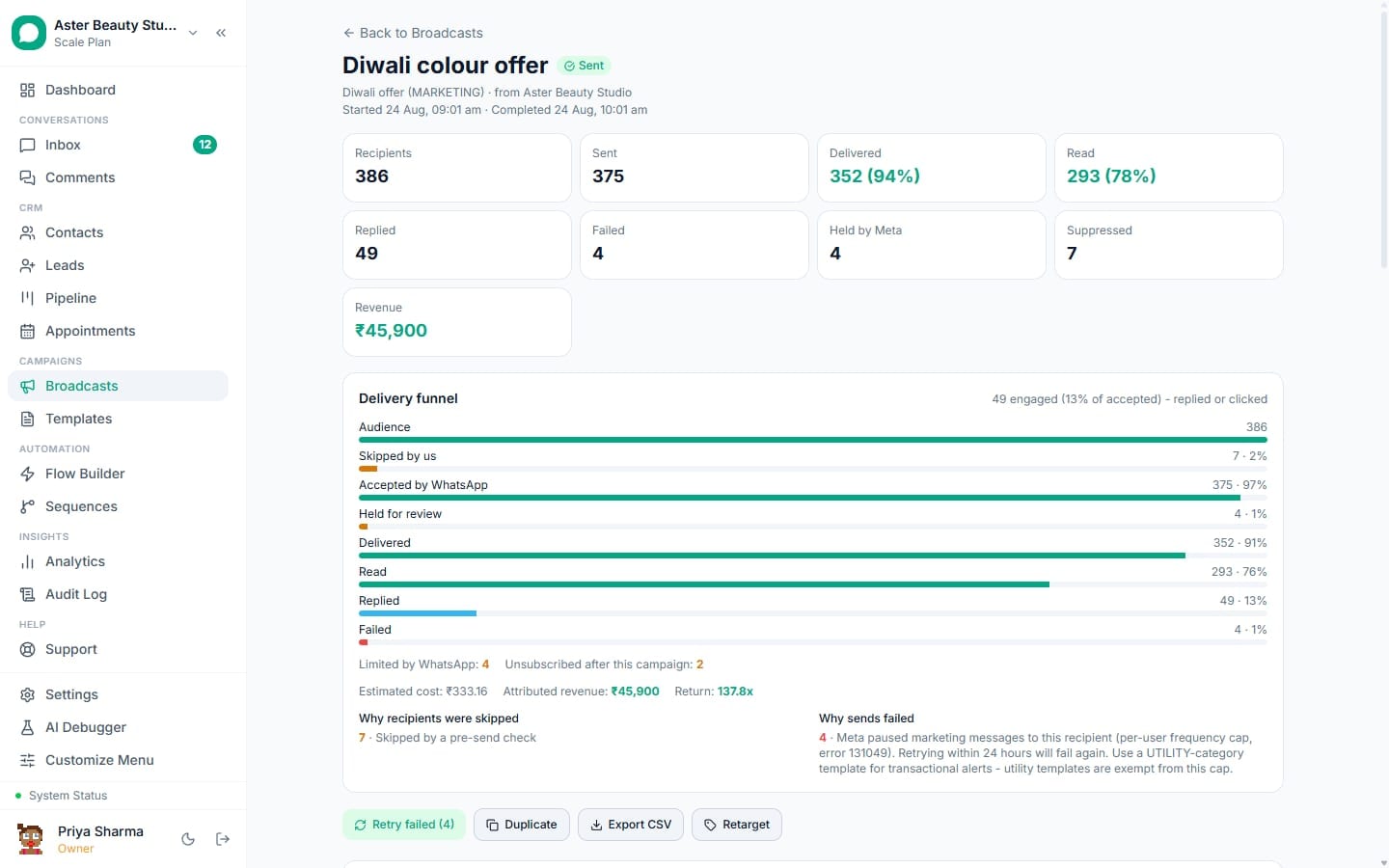
- Every recipient has a real status (sent, delivered, read, failed, suppressed, held, skipped_quota, cancelled), never a guess
- A campaign that hits a wall (a paused template, a stalled quality rating, a spent daily budget) parks itself and tells you why
A WhatsApp broadcast in VGraple CRM is a bulk campaign sent through an approved template to a defined audience, with a per-recipient delivery record from the moment it is queued to the moment it is read, replied to, or refused. What changes for a business is that a campaign stops being a black box: you see who it actually reached, why anyone it did not reach was skipped, and whether it made money, instead of a single "sent to 4,000 contacts" line with no way to act on it.
What you get
- Audience built from tags, saved segments or a CSV upload, with a live recipient count and cost estimate before you send
- Template variable mapping to contact fields with mandatory fallback values, so a missing field never breaks the send
- A WhatsApp-accurate preview rendered against five real contacts before the send button unlocks
- Scheduled, recurring and A/B tested sends, with automatic winner selection
- A recipient state machine (sent, delivered, read, failed, suppressed, held, skipped_quota, cancelled) instead of one flat "sent" count
- Automatic per-number pacing and a daily portfolio budget that stop a campaign before it damages your number
- Link click tracking, reply tagging, and one-click retargeting of readers, repliers, clickers or non-responders
- Revenue attribution per campaign, plus a streamed CSV export that works even on a 50,000-row campaign
How it works
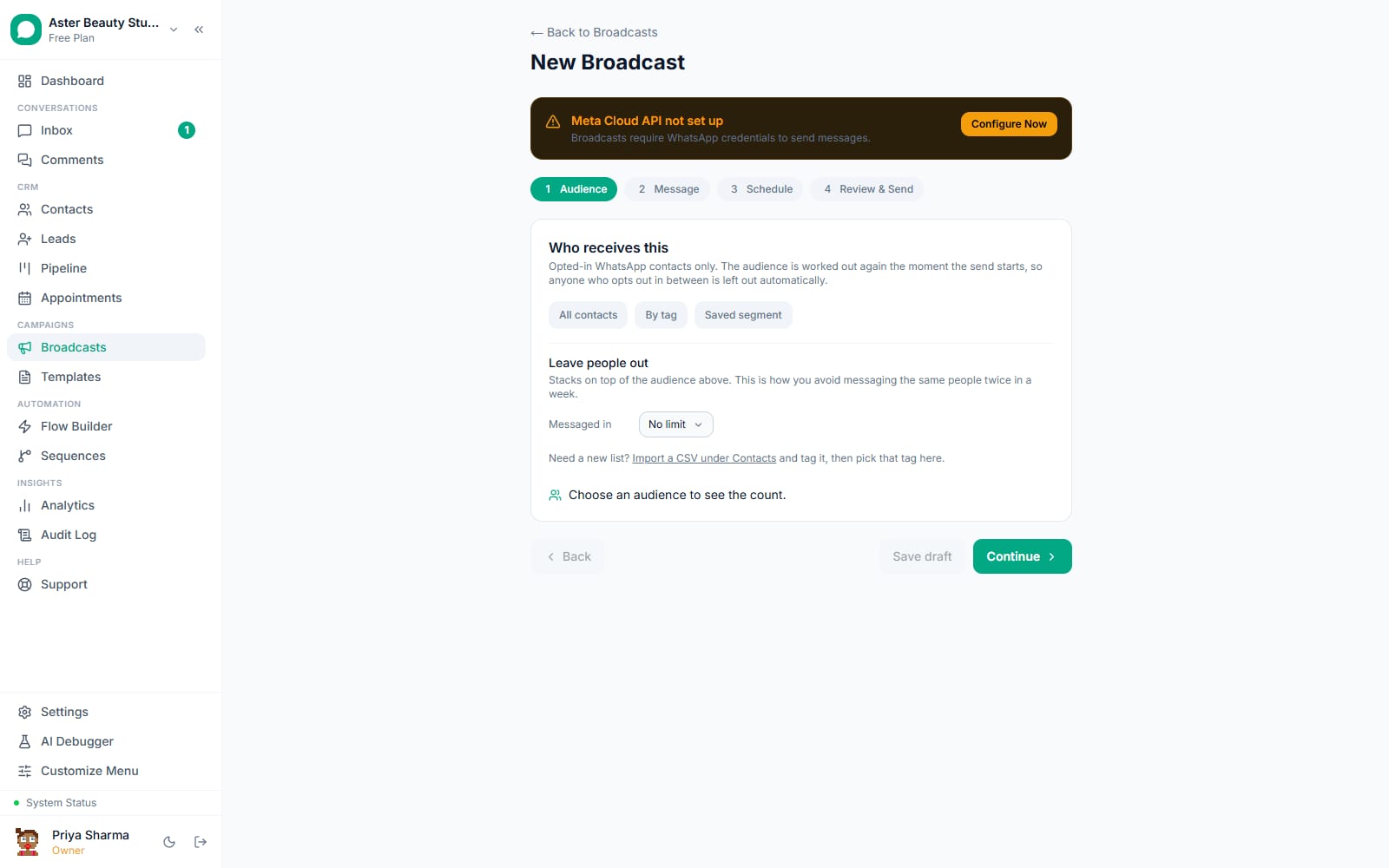
- Build the audience. From Broadcasts, choose New and pick your audience from all contacts, a tag, a saved segment, or a CSV upload. The recipient count updates live as you narrow it, and saved segments are always combined with your safety guards (opted-in, not blocked, a real WhatsApp contact), so a segment can only narrow an audience, never widen it past those checks.
Pick the template and map variables. Choose an approved template, then map each
{{1}},{{2}}variable to a contact field (name, phone, email or a custom field) or static text, with a required fallback value for every variable. The composer renders the message against five real contacts so you see exactly what each of them will receive, including header media and buttons.Schedule and set pacing options. Send immediately, once at a future time, or on a recurring schedule. Turn on A/B testing to split the audience between two template versions, opt into send-time optimisation so each contact is messaged at the hour they historically respond, or hold back a slice of the audience as a holdout to measure the campaign's real effect.
Review the real numbers before sending. The review step states the exact recipient count, the estimated per-country cost, how much of your daily messaging headroom this will use, and what will be skipped and why, before the send button unlocks.
Watch it send, live. Once sending starts, the detail page updates through the funnel (pending, sent, delivered, read) in real time, with a per-recipient table you can filter by status and search by name or phone.
Act on the results. Retry failed sends, cancel a scheduled campaign, stop a send mid-way, retarget a cohort into a new campaign or a drip sequence, or export the full recipient list as a CSV. Replies land in the shared inbox tagged with the campaign name.
How does pacing protect my number?
A WhatsApp number that sends too fast gets throttled or has its quality rating cut, and a damaged quality rating caps how many people you can message at all. VGraple CRM paces every campaign through a token-bucket limiter that sends at 50 messages a second by default, well under Meta's roughly 80/s ceiling, so a short burst from a batch of retries never trips a hard rate limit.
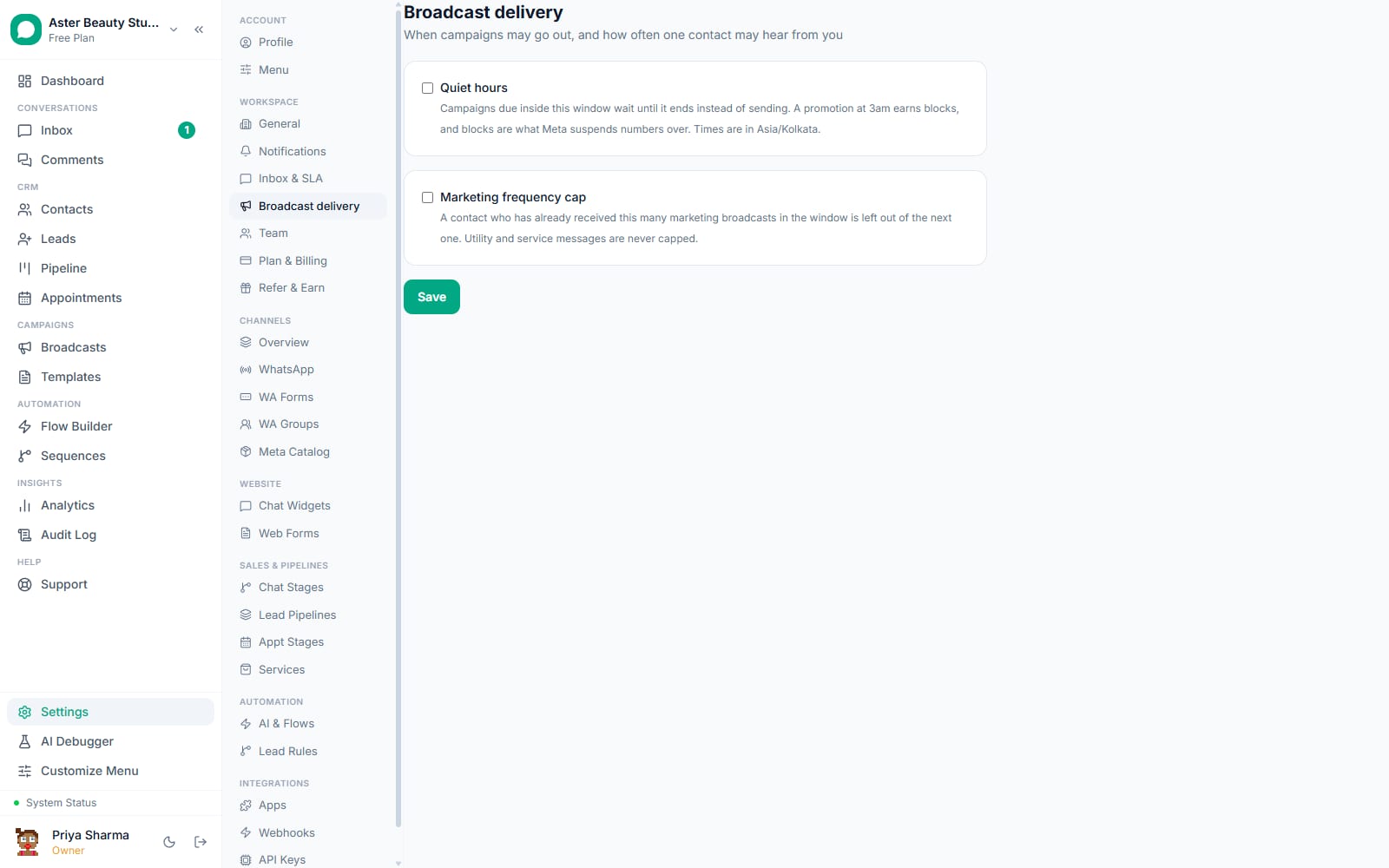
The ceiling adjusts itself to your number's real condition. A YELLOW quality rating halves the rate to 25/s; RED cuts it to a tenth, 5/s. A coexistence number, one you also use in the WhatsApp Business app on your phone, is paced at 4/s because Meta's own ceiling for coexistence is far lower than a Cloud API-only number. If Meta itself answers with a throughput warning (error 130429) mid-send, the pacer halves its rate immediately and does not go back to full speed automatically; a campaign that has already tripped the limit once finishes the rest of its run slower on purpose.
Example
A salon running a Friday flash-sale broadcast to 3,000 contacts on a number with a YELLOW rating sends at 25/s instead of 50/s. The campaign takes about two minutes longer to finish, and the slower pace is part of why the quality rating has a chance to recover instead of dropping further.
What is the daily messaging limit, and why does a campaign stop partway?
Meta caps how many unique people your WhatsApp Business portfolio can start a conversation with in a rolling 24 hours, based on a messaging tier (TIER_50, TIER_250, TIER_1K, TIER_10K or TIER_100K) that Meta assigns and can raise as your sending history builds. Since 2024 this limit applies to your whole portfolio, every phone number under the same business, not to one number in isolation, which is why two campaigns from two different numbers can eat into the same daily budget.
VGraple CRM tracks this limit in real time by counting the unique contacts your portfolio has started template conversations with in the trailing 24 hours. When a running campaign would exceed the remaining headroom, it parks itself with resume_at set to the moment the rolling window reopens and continues automatically from where it stopped, no manual restart needed. If a campaign has auto-continue turned off, the remainder is marked skipped_quota instead, so you can see exactly how many recipients were never attempted rather than assuming they failed.
Why does a broadcast park itself, and what do the reasons mean?
A campaign that keeps firing into a problem it cannot fix wastes your daily budget and damages your number, so the delivery engine stops itself the moment it detects one of five specific conditions and records the reason in plain language on the broadcast detail page.
| Reason shown | What triggered it | What happens next |
|---|---|---|
| Template paused by Meta | Error 132015 (quality review) or 132016 (low quality) | Campaign stays paused until the template is released or you fix and resubmit it |
| Portfolio being paced by Meta | Error 135000, a business-wide marketing halt | All marketing sending across the org pauses for about an hour; utility and service messages are unaffected |
| Quality rating dropped to red | The sending number's live quality rating | Every running campaign on that number is paused so continued sending cannot make the rating worse |
| Over your plan's conversation quota | Monthly conversation limit reached | Campaign pauses until the quota resets or you upgrade |
| Failure rate over 35% | More than 35% of the last 200 sends failed | Campaign stops so a bad audience list or a broken template does not burn the rest of the budget |
A parked campaign is never silently abandoned. You get an in-app alert, a mobile push notification and, where configured, an email, and the broadcast page tells you exactly when it will pick back up on its own versus when it needs you to act.
Why is "suppressed" different from "failed"?
A failed send means Meta accepted the attempt and rejected it, or a delivery error came back later. A suppressed send means the platform refused to attempt it at all, because sending would have been pointless or against Meta's rules. Treating the two the same is how other tools end up "retrying" a message to someone who already opted out, which is exactly the behaviour Meta has penalised WhatsApp Business Accounts for at the account level since April 2026.
VGraple CRM checks every recipient again at the moment of send, not just when the audience was first built, and marks them suppressed for any of: an opt-out, a blocked contact, a number with no valid WhatsApp, a customer who told WhatsApp to stop marketing messages from your business (marketing_stopped_at, set from Meta's user-preferences webhook), sitting inside a 131049 or 131050 suppression window, or being a United States number during Meta's marketing pause on US numbers. Suppressed recipients are never counted as sent, never billed, and never picked up by "Retry failed."
How does A/B testing pick a winner?
Two template versions split a sample of the audience, and the delivery funnel for each arm, delivered, read, replied and clicked, adds up independently. A winner is decided with a two-proportion z-test at 95% confidence, the same statistical bar used to call a winner in any credible marketing experiment, and the remaining audience is released to that winner without re-picking who gets it. If the two versions perform too close to call, VGraple CRM says the test was inconclusive rather than declaring a winner that is really a coin flip.
Example
A real-estate agency tests two versions of a new-listing alert, one led with the price and one with the location. The version leading with location gets a statistically significant higher reply rate at 200 sends into a 4,000-contact audience, and the remaining 3,800 contacts automatically go to that version.
What does send-time optimisation actually do?
A nightly job looks at each contact's own history of inbound messages and works out the hour of day they tend to reply. A campaign that opts into send-time optimisation stamps every recipient with their own send time inside the campaign's pacing window, rather than sending everyone at the moment you click send. It is a heuristic based on the contact's real behaviour, not a machine-learning model, and it never delays anyone past the campaign's own send window; a contact whose "best hour" has already passed still gets the message on schedule.
How do clicks and revenue get attributed to a campaign?
Every recipient of every campaign gets an opaque, signed link token, so a click ties back to exactly one recipient of one campaign without putting any contact data in the URL itself. Link previewers and scanners are excluded from the click count, so a messaging app's automatic link-preview fetch does not inflate your numbers. WhatsApp's own quick-reply button presses and Meta's click webhooks for Marketing Messages API sends merge into the same store, so click tracking works whether the button is a link or a reply.
Revenue attribution links a purchase or payment on the account back to the contact and, through them, to the campaign that reached them. The campaign detail page shows attributed revenue next to the funnel and the estimated send cost, so a campaign's numbers mean something instead of standing alone. /broadcasts/compare puts up to five campaigns side by side for exactly this reason: one campaign's read rate or revenue only tells you something next to another campaign's.
With VGraple CRM vs doing it by hand
| Sending from a phone or a basic tool | VGraple CRM broadcasts | |
|---|---|---|
| Audience | Manually copying numbers into a list | Live count from tags, segments or CSV, guarded against opted-out and blocked contacts automatically |
| Pacing | None, or a fixed delay regardless of number health | Token-bucket pacer that adapts to quality rating in real time |
| Daily limit awareness | Found out from a wave of failures | Tracked live; campaign auto-pauses and resumes on its own schedule |
| Why a message did not arrive | "Failed", no further detail | Recipient status plus the exact Meta error code and a plain-language reason |
| Suppression vs failure | Not distinguished; suppressed contacts get retried anyway | Explicitly separated; suppressed rows are never retried |
| A/B testing | Manual, no statistical test | Built in, decided by a two-proportion z-test at 95% confidence |
| Recovery from a crash or deploy | Restart the whole send | Resumes automatically from the recipients still pending |
| Revenue per campaign | Not tracked | Attributed and shown on the campaign detail page |
Who uses it
Salons and spas run appointment-gap fillers and festive offer broadcasts to their contact list, using tags for service history so a hair-colour offer only reaches people who have booked colour before. See WhatsApp CRM for salons.
Clinics send batch reminders for camp days or seasonal vaccination drives as utility-category sends where the content qualifies, keeping marketing sends for genuinely promotional offers separate so the two never share a suppression budget. See WhatsApp CRM for clinics.
D2C stores run flash-sale and back-in-stock broadcasts segmented by past purchase category, then retarget the "read but did not click" cohort with a different creative the next day. See WhatsApp CRM for D2C.
Real-estate agencies broadcast new listings to buyers tagged by budget and locality, then use reply tagging to route anyone who responds straight into the leads pipeline. See WhatsApp CRM for real estate.
What Meta allows
VGraple CRM's defaults sit deliberately under every one of those Meta ceilings: 50/s instead of 80/s, live tracking of your portfolio's rolling 24-hour usage instead of finding out from a wave of failures, and pre-flight suppression checks that stop a send before Meta has to reject it. None of this requires configuration; it runs the same way on every plan.
Plans and limits
Broadcasts are available on every plan, including Free, and are metered by your plan's monthly conversation limit rather than a separate broadcast cap: Free includes unlimited conversations, Starter 2,000, Growth 10,000, and Scale is unlimited. Every protection described on this page (pacing, the daily portfolio budget, auto-park, suppression checks, A/B testing, send-time optimisation, holdouts, revenue attribution and the public API) ships on every plan at every tier. Analytics dashboards for campaign performance require Starter or above, and the AI assistant used for reply suggestions on inbound replies requires Growth or above.
Recent improvements
- 2026-08-19: Broadcast v3 phase 4 shipped, adding the pause-reason system that names exactly why a campaign stopped (template pause, portfolio pacing, quality collapse, quota, failure-rate breaker) instead of leaving a campaign silently stalled.
- 2026-08-18: Broadcast v3 phase 1 moved sending into a dedicated durable worker process on a Postgres-backed queue, so a deploy or crash mid-send resumes from where it stopped instead of losing the campaign.
- 2026-08-18/19: A/B testing, send-time optimisation, holdouts, click tracking with per-recipient signed tokens, and post-campaign follow-up automation all shipped as part of the same broadcast v3 programme.
- 2026-07-14: Delivery error handling rebuilt so every Meta error code (131049, 131050, 131047, 131026, 130472 and more) maps to a plain-language reason stored on the message and shown in the funnel, instead of Meta's raw one-line description.