On this page
In short
- Customers request an appointment inside a WhatsApp conversation, through your chatbot or AI assistant, with no external booking page
- Reminders are automation flows you build with your own timing, not a fixed 24-hour and 1-hour schedule
- Calendly stays your calendar of record if you already use it; every booking syncs in, matched to the WhatsApp contact by phone number
- Custom stages can trigger a WhatsApp flow automatically the moment an appointment enters or leaves them
VGraple CRM lets customers request and confirm appointments inside a WhatsApp conversation, with the booking landing on a shared calendar your team manages, reminders sent as automated templates on a schedule you choose, and a direct sync to Calendly if that is already your booking tool. What changes for a business is that booking stops needing a separate app or a phone call: the request happens in the same chat the customer is already using, and your team sees every upcoming appointment, and every no-show risk, in one place instead of scattered across a calendar app and a WhatsApp thread.
What you get
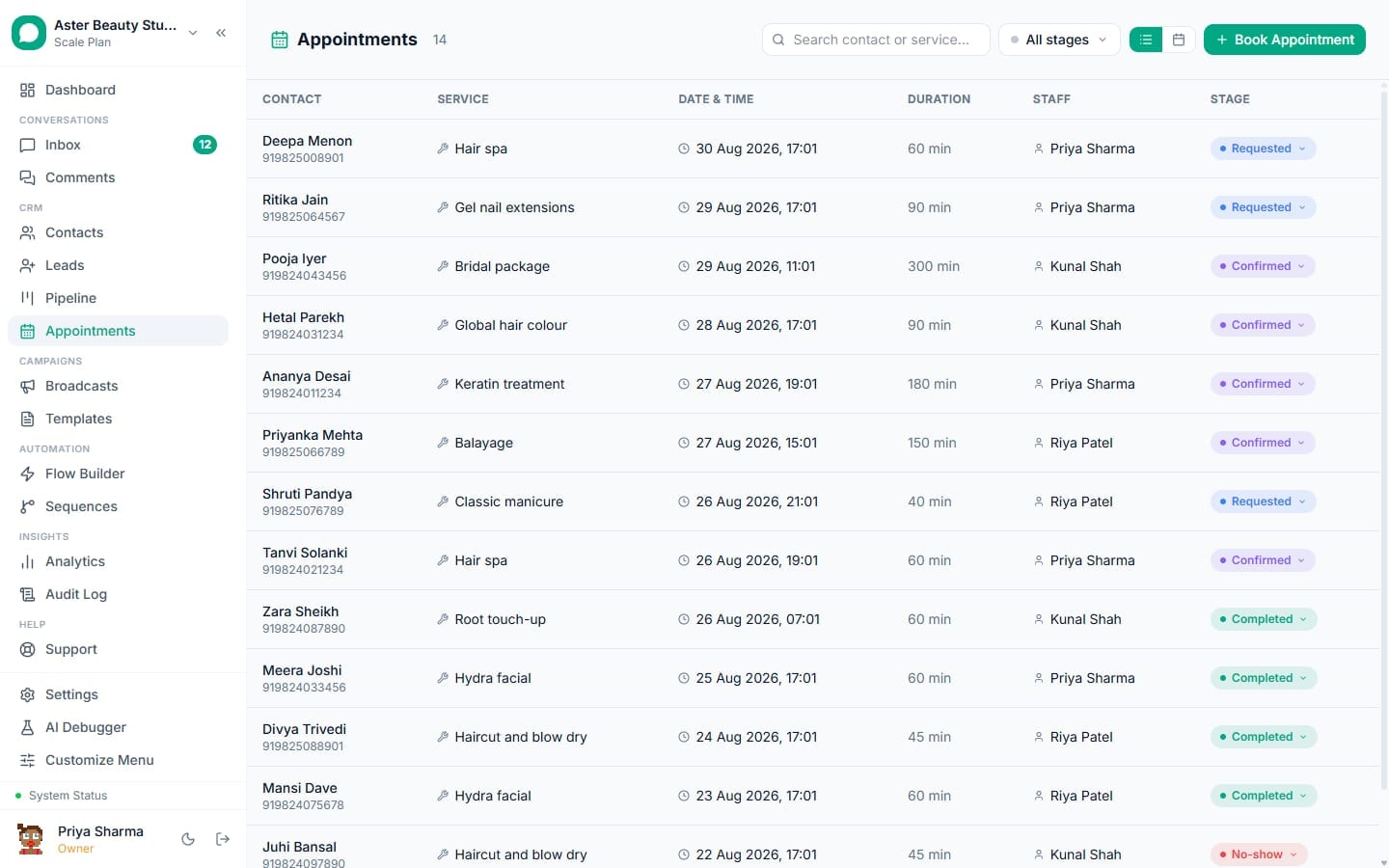
- A calendar and list view of every appointment, filterable by staff member, service or date
- Booking captured conversationally, through a chatbot flow or the AI assistant's booking action, with no external page
- Calendly sync: every booking, cancellation and reschedule made in Calendly lands here automatically, matched to the WhatsApp contact
- Reminder flows you configure with your own timing, sent as approved WhatsApp templates
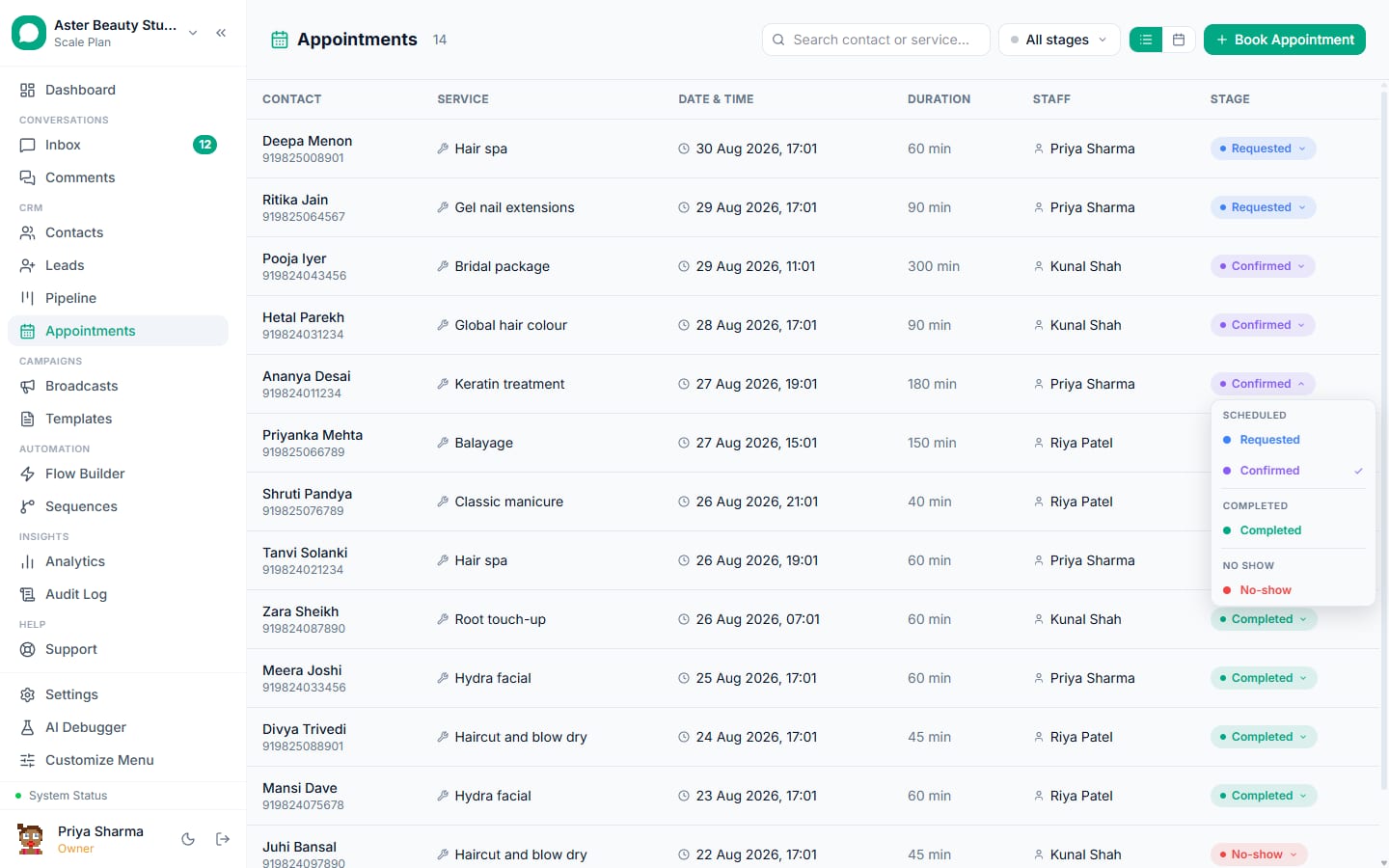
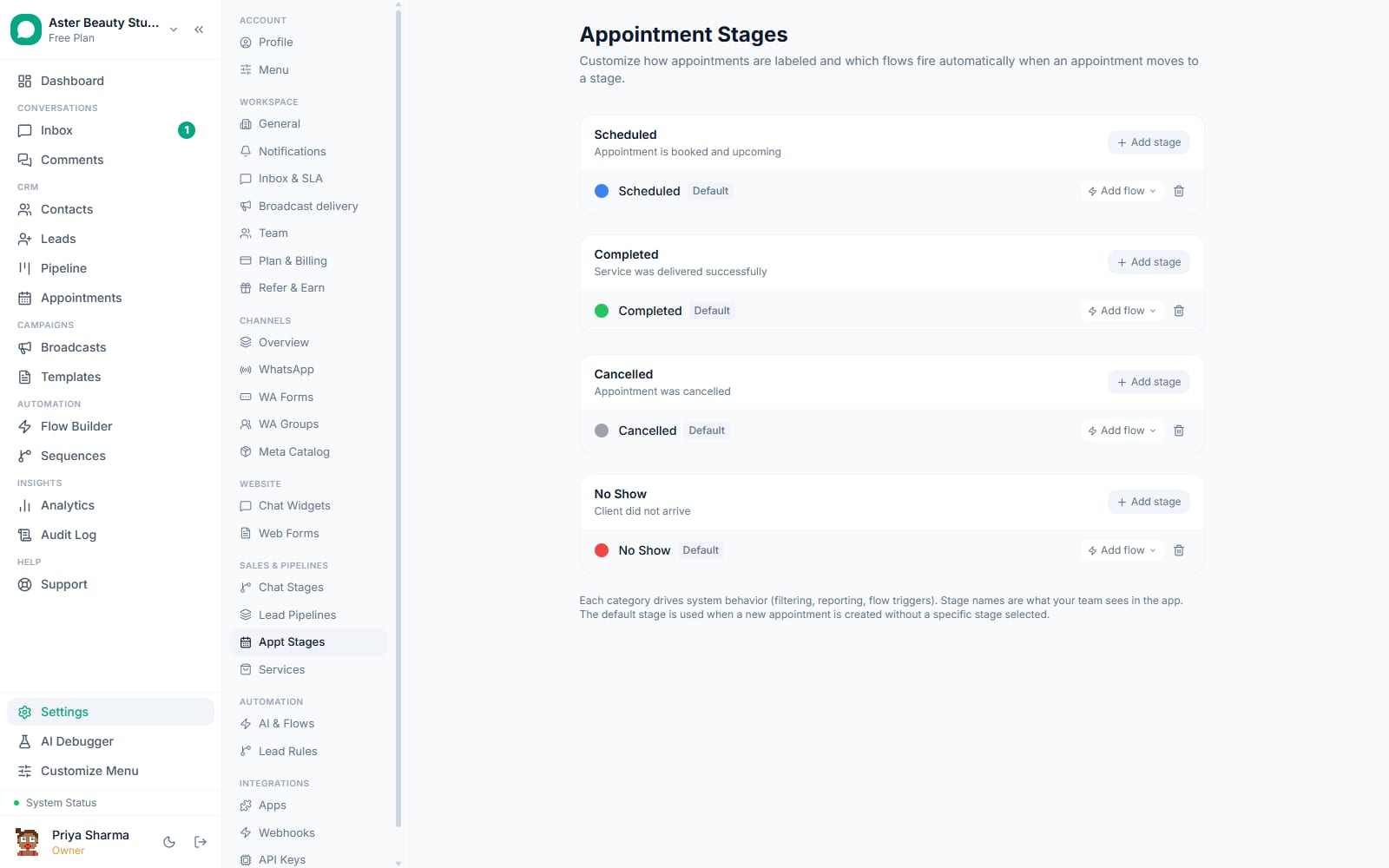
- Custom stages (beyond the default scheduled, completed, cancelled, no-show) with a flow that fires automatically on entry or exit
- Assignment to a specific staff member, visible on the calendar and in the customer's confirmation
- Full parity in the Android app for viewing and updating bookings on the move
How it works
- Define your services and stages. Go to Settings and set up the services or appointment types your business offers, then open Appointment Stages to review or add stages beyond the defaults (Scheduled, Completed, Cancelled, No Show), each with its own colour.
Connect a booking source. Add an Appointment node to a chatbot flow so customers can request a slot inside a conversation, turn on the AI assistant's appointment action so it can take a request directly, or connect Calendly if that already runs your calendar; a connected Calendly account syncs every booking into VGraple CRM automatically.
Build reminder flows. Create an automation flow with an appointment-reminder trigger and set how many hours before the appointment it should fire, commonly one flow at 24 hours and another at 1 hour, sending an approved reminder template with the date, time and any preparation notes.
Manage bookings from the calendar. See every appointment in a calendar or list view, filter by staff or service, and open any appointment to see the customer, assigned team member, notes and current stage.
Move a stage and let automation follow. Change an appointment's stage from the detail view or the calendar, and any flow attached to that stage's entry or exit fires automatically, sending a confirmation, a no-show follow-up, or whatever message you configured for that transition.
How does Calendly sync actually work?
Once you connect your Calendly account, VGraple CRM listens for Calendly's own webhook events, invitee created, invitee canceled, and, for orgs where webhooks are not available on their Calendly plan, a periodic poll picks up the same changes. Each Calendly booking creates or updates an appointment record, matching the invitee to an existing WhatsApp contact by phone number where Calendly captured one, so a customer who books through your public Calendly page and later messages you on WhatsApp shows up as the same person with the same history.
Because Calendly enforces its own availability rules before a slot is ever offered, a Calendly-sourced booking is already conflict-free by the time it reaches VGraple CRM, and Calendly's own connections to Google Calendar or Outlook keep working underneath it exactly as they did before you connected VGraple CRM.
Example
A clinic keeps its Calendly page as the public booking link on its website, embedded and shared on WhatsApp. A patient booking through that link shows up in VGraple CRM's Appointments calendar within moments, matched to their WhatsApp contact, so the front desk sees it alongside bookings taken directly over chat.
How do reminders actually get scheduled?
A reminder is an automation flow with a trigger type of "appointment reminder" and a configurable number of hours before the appointment start time; the platform checks every few minutes for appointments entering that window and fires the flow once per appointment. There is no single hard-coded reminder schedule; the common pattern is two flows, one at 24 hours and one at 1 hour, but a business can add a third at, say, 3 days for a consultation that needs preparation, or run only one.
Every reminder is skipped automatically for a contact who cannot legally or technically receive a WhatsApp template, an opted-out contact, a number Meta has already told you cannot be reached, so a reminder flow never wastes a send on someone who was never going to get it.
What happens when a customer wants to reschedule?
Confirmation and reminder templates invite the customer to reply if they need to change the time, and that reply arrives as a normal message in your shared team inbox, tagged to the same contact and visible next to the appointment record. What VGraple CRM does not do today is automatically parse that free-text reply and move the calendar entry itself; an agent reads the reply and updates the appointment's time or stage by hand. For a business handling a high volume of reschedules, pairing this with a WA Flow that asks for a specific new date and time, instead of leaving it to free text, gives the agent structured data to act on instead of a sentence to interpret.
| Reschedule path | What happens |
|---|---|
| Reply to a reminder template | Lands in the inbox tagged to the contact; agent updates the appointment manually |
| Reschedule through Calendly | Syncs automatically; the appointment record updates to the new time |
| Reschedule through a WA Flow | Structured new date/time submitted; still requires an agent or automation to apply it |
Who uses it
Clinics book consultations through a WhatsApp chatbot flow and send a 24-hour reminder with a pre-visit checklist, cutting down no-shows that a phone-only booking process misses. See WhatsApp CRM for healthcare.
Salons and spas assign each booking to the specific stylist the customer asked for, with the confirmation naming that stylist, and a no-show stage that automatically triggers a rebooking message. See WhatsApp CRM for salons.
Coaching institutes use appointment booking for demo classes and counselling sessions, syncing from a public Calendly link shared in ad replies straight into the same pipeline as their other leads. See WhatsApp CRM for education.
Real-estate agencies book property viewings with an assigned consultant and send a reminder with the address and consultant's name the morning of the visit. See WhatsApp CRM for real estate.
With VGraple CRM vs a phone-and-calendar-app process
| Phone calls and a separate calendar app | VGraple CRM appointments | |
|---|---|---|
| Booking channel | A phone call or a separate booking page | Inside the WhatsApp chat the customer is already using |
| Reminders | Manual, or none | Automated templates on a schedule you configure |
| No-show follow-up | Someone has to remember | A stage-triggered flow can fire automatically |
| Calendar visibility | One person's calendar app | A shared calendar filterable by staff and service |
| Existing Calendly setup | Runs standalone | Syncs in automatically, matched to the WhatsApp contact |
| Mobile access for staff | Depends on the calendar app | Same calendar and stages in the Android app |
What Meta allows
Plans and limits
Appointments are available on every plan, including Free. The calendar, custom stages with flow triggers, Calendly sync and staff assignment are identical at every tier; reminder templates count as outbound conversations against your plan's monthly quota the same as any other automated WhatsApp send.
Recent improvements
- 2026-07-16: Upstream error messages from failed appointment-related sends are now sanitised before display, and alert push notifications deep-link directly to the affected appointment instead of a generic screen.
- 2026-07-03: Calendly sync now imports the invitee's booking phone number and can upgrade an existing web-only contact to a full WhatsApp contact, and syncing no longer creates a stray empty conversation for every booking.
- 2026-07-13: The Zapier integration and outbound webhook event API shipped, giving appointment events a path into external tools beyond Calendly.
- 2026-07-15: The app-wide dropdown and settings-tab consistency sweep reached the Appointments calendar filters and the Appointment Stages settings page.