On this page
In short
- "Log Deal" on any conversation records a revenue event in seconds, no separate invoicing tool needed to know a message made money
- Revenue auto-attributes to the broadcast that reached the contact in the last 7 days if you do not pick one, and to the ad if the conversation carries Click-to-WhatsApp attribution
- A paid payment link logs its own revenue event automatically the moment the webhook confirms payment, with no manual entry
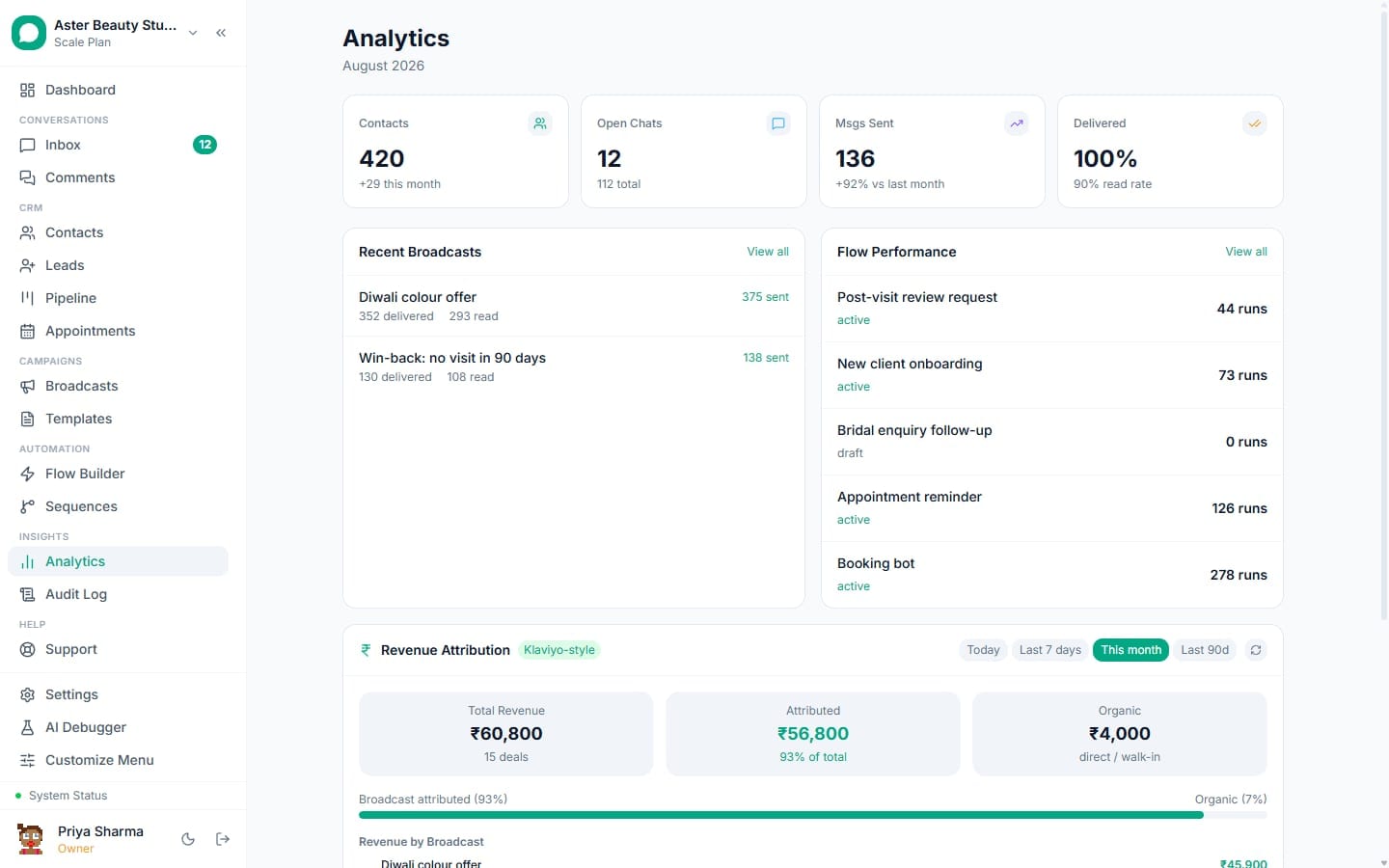
- The Revenue Attribution dashboard splits attributed versus organic revenue and ranks campaigns by ROWS, Return on WhatsApp Spend
Revenue Attribution in VGraple CRM ties a sale back to the exact WhatsApp conversation, broadcast, ad and agent that produced it, either logged by hand in seconds or captured automatically when a payment link is paid. What changes for a business is the answer to a question every WhatsApp tool struggles with: not "did we send messages," but "did those messages make money, and which ones." A campaign's read rate stops being the end of the story and becomes one line in a funnel that ends in a rupee figure.
What you get
- A "Log Deal" action on every conversation that records revenue in seconds, with amount, currency, order ID and notes
- Automatic attribution to the broadcast that reached the contact in the last 7 days, with a manual override when the default is not what you want credited
- Automatic revenue logging when a payment link sent in chat is paid, no manual entry required
- Independent, simultaneous attribution to a Click-to-WhatsApp ad when the conversation carries that attribution, alongside broadcast credit
- A Revenue Attribution dashboard splitting total, attributed and organic revenue, with a visual attribution bar and per-broadcast ranking
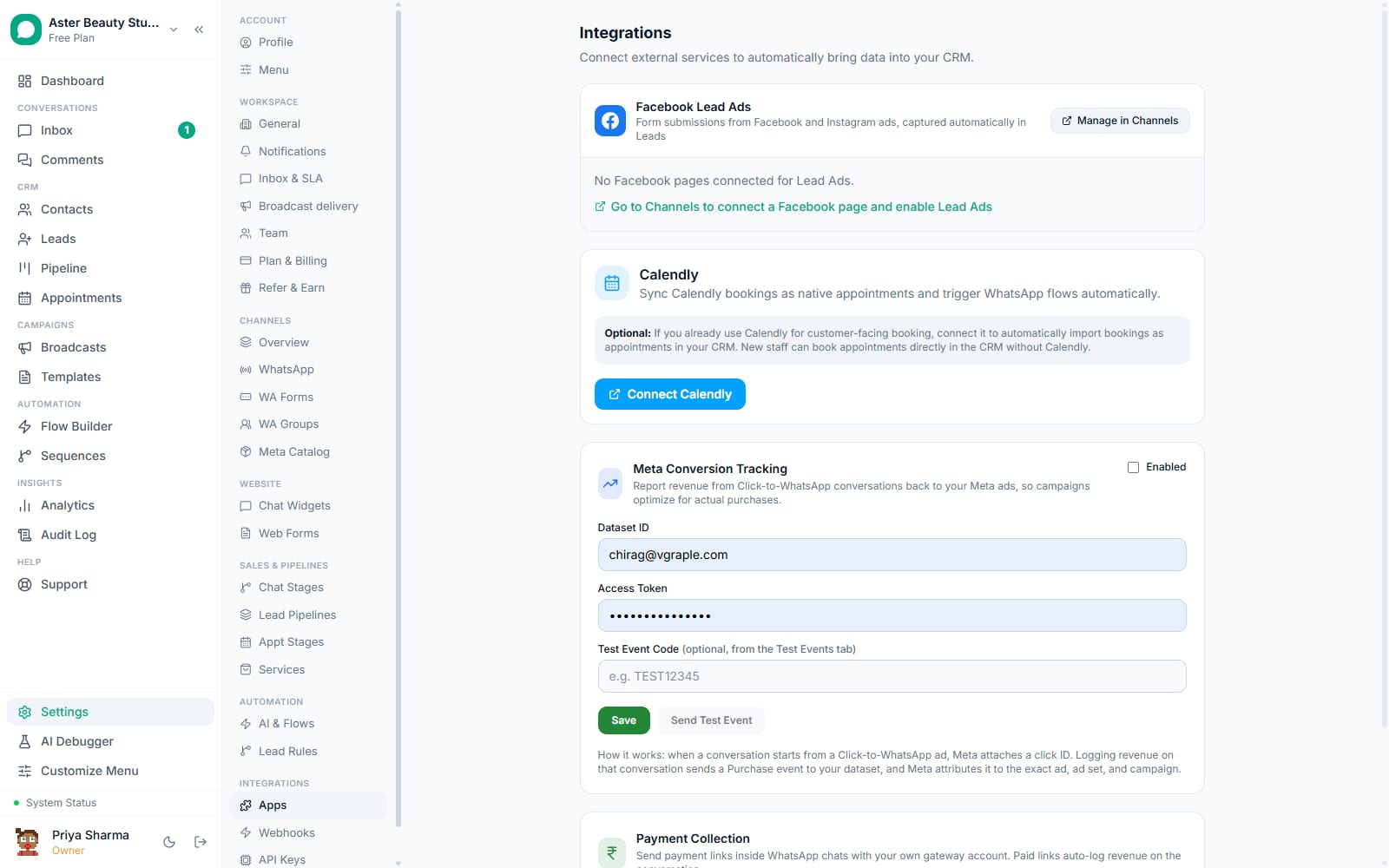
- Meta Conversions API reporting of a Purchase event whenever revenue is logged on an ad-attributed conversation
- Revenue included in every broadcast's CSV export, next to delivery status, replies and clicks
How it works
- A conversation results in a sale. Whether it closed by chat, by phone, or in person after a WhatsApp exchange, the deal exists and needs recording against the conversation that led to it.
Log the deal. From the conversation's Info panel, choose Log Deal, enter the amount and currency (INR by default), and optionally an order ID and notes. The revenue event is created immediately and visible on the conversation.
Attribution resolves automatically. If no broadcast is specified, VGraple CRM checks whether this contact received a broadcast in the last 7 days and, if so, credits that campaign. If the conversation carries
ctwa_source, the ad's identity is captured with the revenue too, independently of the broadcast check.A Purchase event reports to Meta, if configured. When the conversation has a Click-to-WhatsApp click ID and Meta Conversions API is set up in Settings, the same request that creates the revenue event sends a Purchase event to your dataset, attributing the sale back to the exact ad in Meta's own reporting.
Or it happens without anyone touching the CRM. A payment link sent in chat, paid through Cashfree or Stripe, triggers the gateway's webhook the moment the customer pays. The webhook marks the payment request paid, creates the revenue event, reports the CAPI Purchase event where applicable, and drops a confirmation message into the thread automatically.
Revenue shows up everywhere it belongs. On the conversation itself, on the broadcast's detail page next to its delivery funnel, in the Revenue Attribution dashboard, and, once exported, on the campaign detail page next to the delivery funnel (the recipient CSV export carries statuses, error codes and reply times).
How does automatic broadcast attribution actually decide credit?
Manually picking a broadcast for every sale does not scale past a handful of deals a week, and forcing every sale into a campaign bucket when many are genuinely organic produces numbers nobody trusts. When a deal is logged without an explicit broadcast, VGraple CRM looks up the most recent broadcast that reached this specific contact within the last 7 days and, if one exists, credits it automatically. The 7-day window is a judgment call, not a claim of perfect causality: a sale further out than a week from the last broadcast is treated as organic rather than force-attributed to a campaign that likely had nothing to do with it.
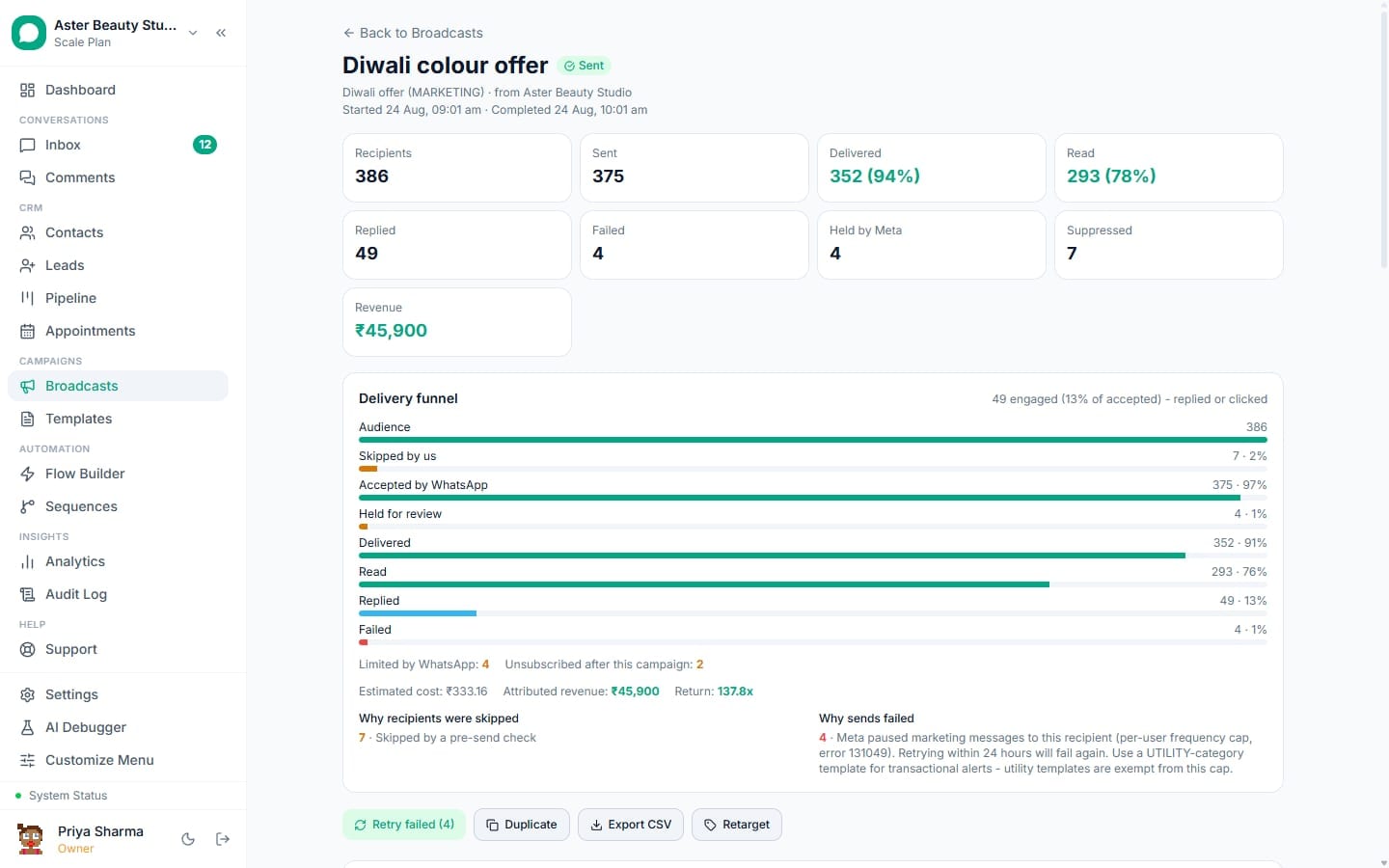
You can always override the automatic pick by specifying a broadcast_id explicitly when logging the deal, for cases where two campaigns reached the same contact close together and you know which one the customer actually mentioned.
Example
A salon sends a Friday flash-sale broadcast to 3,000 contacts. Forty of them book an appointment through WhatsApp over the following four days, some the same day, some three days later. Every one of those forty deals, logged from the conversation, auto-attributes to the Friday broadcast, giving the salon a real revenue figure for that specific campaign rather than a guess.
What does the Revenue Attribution dashboard show?
A single revenue number tells you almost nothing about what is working; the useful view splits it into where it came from. The dashboard shows total revenue for the selected period (Today, Last 7 days, This month, Last 90 days), how much of it is attributed to a broadcast versus organic, expressed both as a rupee figure and a percentage bar, and a per-broadcast ranking that shows revenue, number of deals, and conversion rate (deals as a percentage of that broadcast's sent count) for the top five campaigns by revenue.
| Metric | What it measures |
|---|---|
| Total Revenue | Every logged revenue event in the period |
| Attributed Revenue | Revenue tied to a specific broadcast |
| Organic Revenue | Revenue with no broadcast in the 7 days before the deal |
| Revenue by Broadcast | Top 5 campaigns ranked by revenue, with deal count and conversion rate |
| ROWS | Return on WhatsApp Spend, revenue relative to what was spent sending the campaign |
An org with zero revenue logged sees a clear empty state pointing at exactly how to start, "Open any conversation, Info tab, Log Deal," rather than a blank chart with no explanation.
How does revenue connect to Meta Conversions API?
Meta's ad algorithm optimises toward whatever signal it is given, and a signal that stops at "message received" tells it nothing about whether that message turned into money. When a revenue event is created on a conversation that carries a Click-to-WhatsApp click ID (ctwa_clid), and your organisation has a Meta Conversions API dataset configured, a Purchase event is sent to that dataset in the same request that creates the revenue record. The event uses action_source: "business_messaging", the field Meta's documentation specifies for chat-originated conversions, and carries the amount, currency, an order ID when supplied, and the WhatsApp Business Account ID.
This is entirely separate from your own revenue record, which is created either way; CAPI reporting is what tells Meta about a sale it would otherwise never know happened, so its ad delivery can find more people who actually buy instead of more people who merely reply.
How does a payment link log its own revenue?
Requiring someone to remember to log a deal after every paid invoice guarantees some sales never get recorded. A payment link sent through VGraple CRM, whether the customer paid through Cashfree or Stripe, carries its own webhook: the moment the gateway confirms payment, the payment request is marked paid, a revenue event is created automatically with the source set to the gateway used, and a confirmation message ("Payment of INR 2,500 received. Thank you!") is posted into the thread. The whole sequence, including the Meta CAPI report if the conversation is ad-attributed, runs off the webhook with no manual step, and it is idempotent: a webhook retry for a payment already marked paid is a no-op rather than a duplicate revenue event.
Example
A D2C store sends a payment link for a custom order in a WhatsApp chat. The customer pays via UPI through the link twenty minutes later. Revenue logs itself, the ad that originally brought this customer in (if any) gets its Purchase event, and the customer sees a payment confirmation in the same thread, all without the store owner opening the CRM once.
Who uses it
Salons and spas attribute booking revenue from flash-sale broadcasts back to the specific campaign, so the owner can tell which offers actually filled appointment slots rather than just generating replies. See WhatsApp CRM for salons.
D2C stores track revenue per broadcast and per Click-to-WhatsApp ad simultaneously, since a single campaign often overlaps with paid ad traffic and the two need separate credit. See WhatsApp CRM for D2C.
Real-estate agencies log deal revenue on long-running conversations that started from a listing broadcast weeks earlier, using the manual broadcast override since the automatic 7-day window rarely applies to a property sale. See WhatsApp CRM for real estate.
Travel agents attribute package bookings to seasonal broadcasts and Click-to-WhatsApp ad campaigns side by side, ranking which specific offer produced actual bookings once a season ends. See WhatsApp CRM for travel agencies.
What Meta allows
VGraple CRM never estimates or backfills an ad attribution it does not have. A conversation without a captured ctwa_clid simply logs revenue without a CAPI report, which is the accurate state rather than an inferred one.
Plans and limits
Logging revenue on a conversation, payment-link auto-attribution and Meta Conversions API reporting are available on every plan, including Free, with no cap on the number of revenue events. The Revenue Attribution dashboard, its date-range views and the per-broadcast breakdown require Starter or above, gated the same way as the rest of the Analytics module.
Recent improvements
- 2026-08-22: Cashfree's in-chat payment webhook was corrected to read the real payload shape Cashfree sends (
data.cf_payment_id,data.payment_amountat the top level rather than nested underdata.payment), fixing revenue events that were silently never created for Cashfree-paid links. - 2026-08-19: Broadcast v3 added revenue to the campaign comparison view at
/broadcasts/compare, so up to five campaigns can be ranked by revenue, delivery and cost side by side. - 2026-07-14: The Revenue Attribution widget's date-range presets (Today, Last 7 days, This month, Last 90 days) shipped on the Analytics page, alongside the existing all-time total.
- 2026-07-12: In-chat payment collection with the org's own Cashfree or Stripe account shipped, giving payment links their own automatic revenue-logging path independent of manually logging a deal.
- 2026-07-11: Meta Conversions API Purchase reporting shipped, sending revenue events to your configured dataset automatically whenever a deal is logged on an ad-attributed conversation.