On this page
- The statuses, in the order they happen
- Sent, delivered, read: what to trust
- Failed: the error code is the instruction
- Suppressed is not failed
- Held and skipped
- The funnel ratios
- How the statuses reach you
- Reading a campaign page in two minutes
- Statuses on other channels
- What changes when read receipts are off
- What to do after a campaign
- Timestamps that tell a story
- What VGraple CRM does here
Too long? Read this
- Meta reports four message statuses through webhooks: sent, delivered, read and failed (with an error code); a platform adds its own: suppressed, held, skipped, cancelled
- Ticks on the phone map to the same statuses: one grey (sent), two grey (delivered), two blue (read); read is undercounted by users with receipts off
- Failed carries the reason (131049 cap, 131026 not on WhatsApp, 132015 template paused); suppressed means the platform refused to attempt, which is different and never billed
- What to do with each status, and the funnel ratios that matter
Every message sent through the WhatsApp Business API reports back through webhooks: sent when Meta accepts it, delivered when it reaches the phone, read when it is opened, failed with an error code when it is not. A platform adds statuses of its own for the messages it decided not to attempt or that Meta is holding. Reading those statuses correctly is the difference between a campaign you can improve and a number you damage by retrying the wrong rows. This guide explains each status, what the ticks on the phone correspond to, why read undercounts, how the statuses arrive, and what to do with each.
The statuses, in the order they happen
| Status | Who sets it | Meaning | Phone ticks |
|---|---|---|---|
| Pending | Platform | Queued, not yet sent | None |
| Sent | Meta | Accepted by WhatsApp's servers | One grey |
| Delivered | Meta | Reached the recipient's phone | Two grey |
| Read | Meta | Opened by the recipient | Two blue |
| Failed | Meta | Rejected, or delivery failed later; carries an error code | None |
| Suppressed | Platform | Refused to attempt: opt-out, blocked, no WhatsApp, marketing-stopped, capped window, US pause | None |
| Held | Meta, surfaced by platform | Accepted but withheld by template pacing; resolves on its own | None until released |
| Skipped (quota) | Platform | Daily tier ran out and auto-continue is off | None |
| Cancelled | Platform | Campaign stopped before this row ran | None |
Sent, delivered, read: what to trust
Sent is near-instant and near-certain; a message that stays at sent for hours means the phone is offline or the number is dead. Delivered is reliable. Read is a floor: recipients with read receipts off never register it, and some people read from the notification without opening the chat. Report reads as a trend across campaigns, not as an absolute, and make decisions on replies, button clicks and revenue.
Failed: the error code is the instruction
| Code | Meaning | Action |
|---|---|---|
| 131049 | Recipient at Meta's per-user marketing cap | Do not retry; use utility, engaged segments |
| 131047 | Re-engagement outside the 24-hour window without a template | Send a template |
| 131026 | Not a WhatsApp user or cannot receive | Remove the number |
| 132015 | Template paused | Wait; the campaign resumes automatically |
| 132016 | Template disabled | New template |
| 132000 / 132001 | Parameter mismatch or template missing | Fix variable mapping or language |
| 130429 | Rate limit | Pacing handles it; nothing to do |
| 131048 / 131056 | Spam rate or pair rate limit | Stop sending to that segment; review quality |
| 190 | Token expired | Reconnect the channel |
The error code guides cover each in detail.
Suppressed is not failed
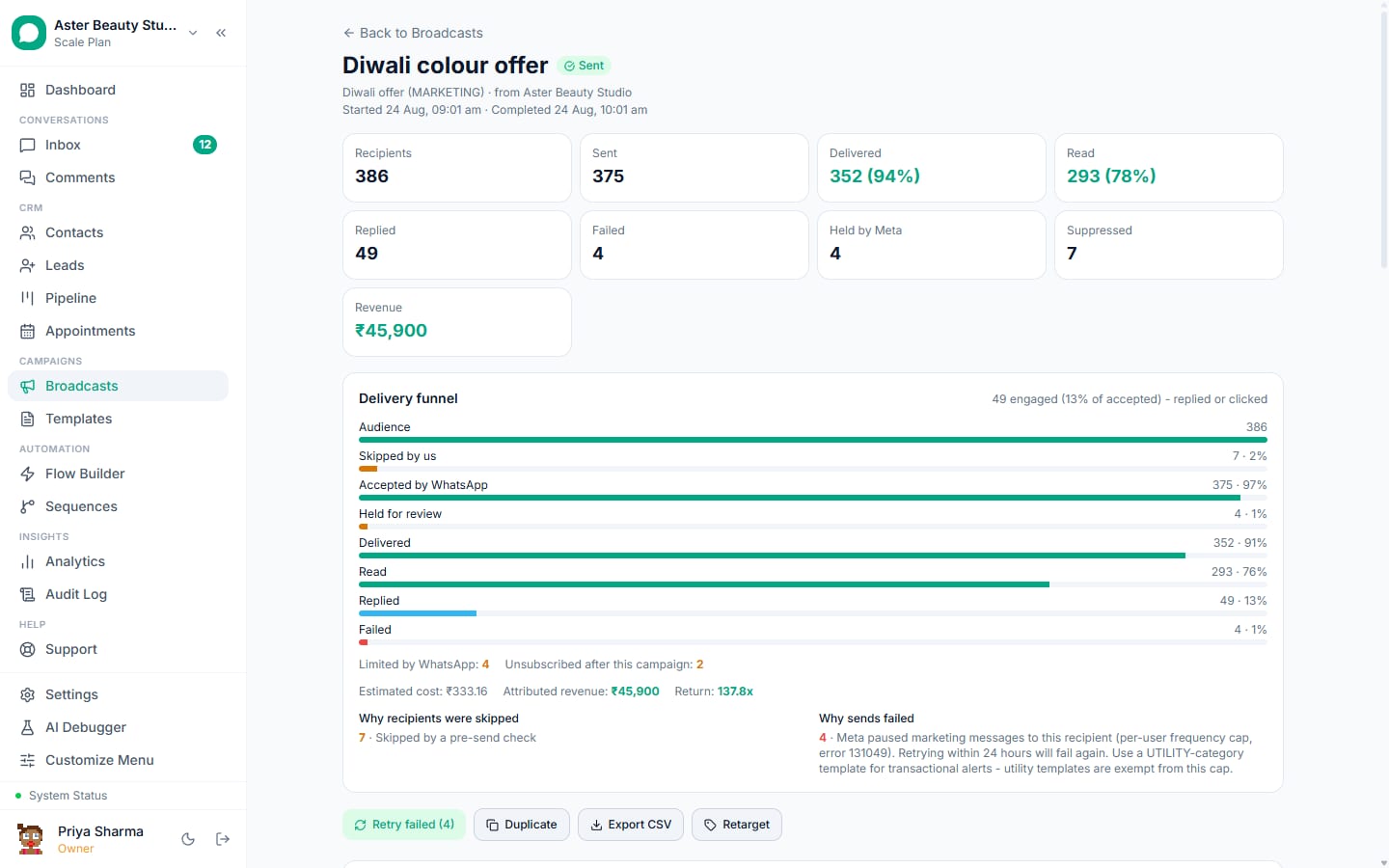
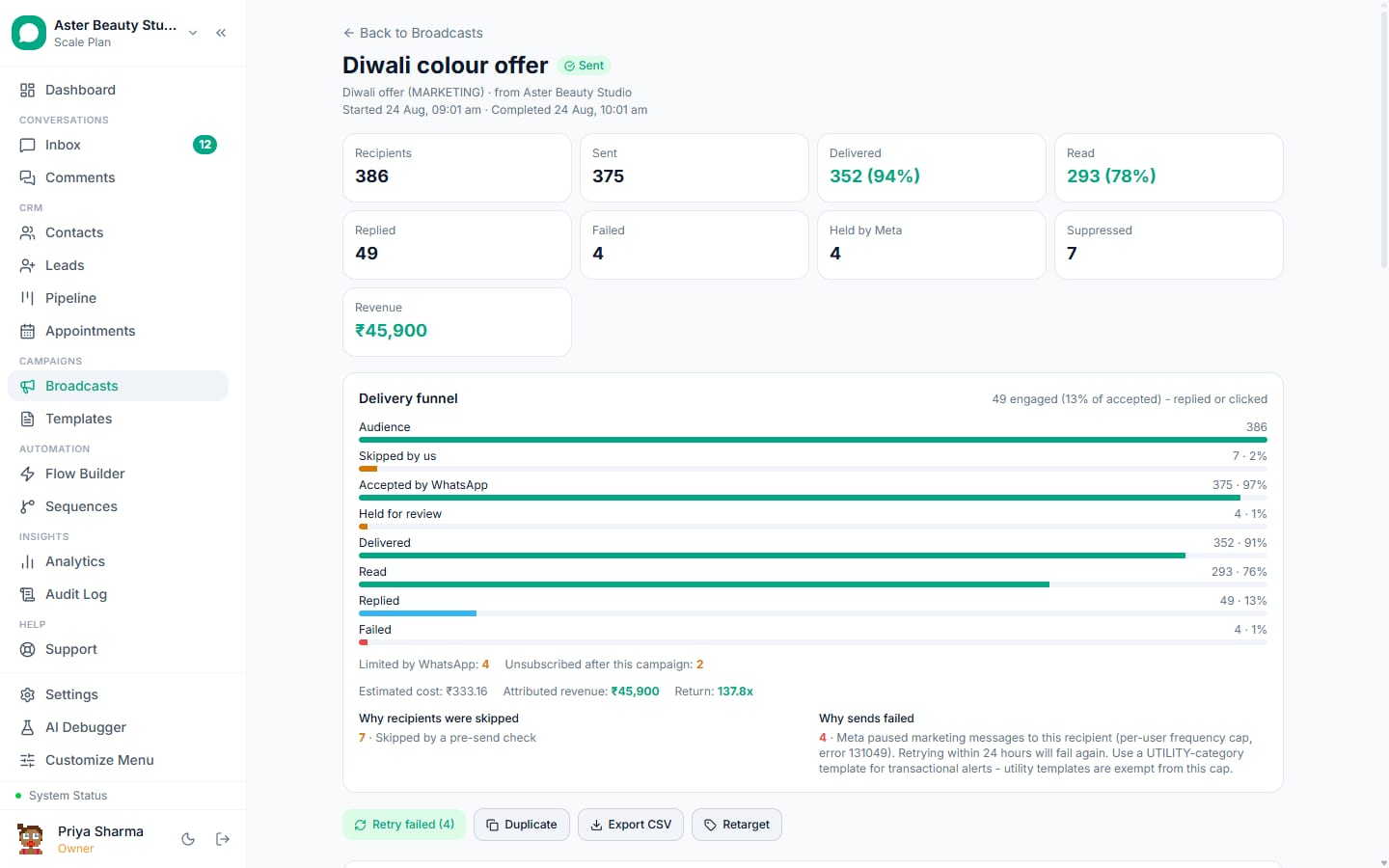
A suppressed row was never sent: the platform saw an opt-out, a block, an invalid number, a marketing-stopped preference from Meta's user settings, a recent 131049 cap, or a US number during Meta's marketing pause, and refused to attempt. It is not billed, it is not counted as sent, and "Retry failed" leaves it alone, because Meta has enforced account-level penalties since April 2026 for retrying recipients who signalled no. Treat the suppressed count as list information, not as a loss.
Held and skipped
Held rows were accepted by Meta but withheld by template pacing: Meta releases a small share of a new marketing template first, watches complaints, then releases the rest. They carry a real message id and resolve to delivered or read on their own; they count as sent. Skipped (quota) rows hit the daily tier with auto-continue off; turn auto-continue on and the campaign parks and resumes instead.
The funnel ratios
| Ratio | Healthy | Diagnoses |
|---|---|---|
| Delivered / sent | 92 to 97 percent | List quality, caps, dead numbers |
| Read / delivered | 60 to 80 percent in 24 hours | Timing, first line, list freshness |
| Replied / delivered | 3 to 10 percent (marketing) | The ask, the button |
| Failed 131049 / sent | Under 10 percent | Segment temperature |
| Suppressed / audience | Whatever it is | Consent hygiene (not a problem) |
How the statuses reach you
Meta posts each status to the platform's webhook within seconds. VGraple CRM updates the recipient row, the campaign counters and the conversation, and can forward the event to your own systems through outbound webhooks (signed, with retries) so an order system or a dashboard sees delivered and read in real time. The campaign page is filterable by status and exportable as CSV with every timestamp and error code.
Reading a campaign page in two minutes
The counters at the top give the funnel: recipients, sent, delivered, read, replied, failed, with held and suppressed shown separately. The tabs filter the recipient table by status; the search finds a name or number; each row shows the timestamps and, for failures, the Meta error code and its plain-language meaning. Export gives the whole table as CSV with every column, which is what finance wants for billing reconciliation and what marketing wants for the next segment. The retarget button turns any filtered view (read but not replied, clicked, replied) into a new audience, and "Retry failed" attempts only rows whose cause is retryable.
Statuses on other channels
Instagram DMs and Messenger report sent, delivered and read through the same webhook pattern with their own timing; web chat reports delivered when the widget receives it and read when the tab is focused. In the shared inbox the ticks under each outbound message reflect the channel's own statuses, so an agent reads the same three ticks regardless of where the customer is.
What changes when read receipts are off
Nothing about delivery. The message is delivered, the customer reads it, and the status stays at delivered forever. Campaign read rates carry an invisible undercount of a few percent (higher for B2B and privacy-conscious audiences). Two consequences: never set a business rule on read alone (for example "resend to non-readers"), and report read rates as a trend, not a number to defend.
What to do after a campaign
- Read the delivered / sent ratio first; if it is low, look at the failed codes before touching anything else.
- Never retry suppressed or 131049 rows. Retry only failures whose cause you fixed (a bad variable, a paused template that resumed).
- Retarget readers who did not reply, two days later, with a different first line.
- Move repliers into the inbox and the pipeline; that is where the revenue is.
- Note the send hour and first line against the read ratio for next time.
Timestamps that tell a story
Sent to delivered under a minute means the phone was online; hours means it was off or the number is dormant. Delivered to read under ten minutes means the notification worked and the first line landed; read hours later means the message waited in a stack. A campaign where reads cluster at 9 pm although you sent at 11 am tells you when that audience actually looks at WhatsApp, which is the input for send-time optimisation.
What VGraple CRM does here
Per-recipient statuses with timestamps and Meta error codes, the suppressed and held distinctions, filters and CSV export, retarget cohorts, auto-continue on quota, and signed outbound webhooks for every status are on every plan including Free.