On this page
Too long? Read this
- A WhatsApp chatbot runs on the WhatsApp Business API and replies to customers automatically: keyword rules for fixed answers, visual flows for branching conversations, an AI chatbot for open questions
- Build the first flow in under 30 minutes: trigger, welcome message with buttons, one branch per button, a question node that saves the answer, a handoff to a person
- Chatbot replies inside the 24-hour window are free; only template messages you start cost money, so a bot that answers inbound enquiries costs nothing per message
- Five bots worth building first (FAQ, lead qualifier, booking, order status, after-hours), what to measure, and the mistakes that make customers leave
A WhatsApp chatbot is an automated conversation on a WhatsApp Business API number: the customer messages, the bot answers, asks, branches and, when it should, hands over to a person. In 2026 you do not write code to build one. A visual flow builder draws the conversation; an AI chatbot trained on your documents handles the questions you did not draw. Replies inside the 24-hour window that a customer's message opens are free at Meta, so a bot that handles inbound enquiries costs nothing per message. This guide covers what a chatbot can and cannot do on WhatsApp, the five bots worth building first, a step-by-step build of the first one, adding AI, and the mistakes that make customers leave.
What a WhatsApp chatbot can do (and what it cannot)
| Can | Cannot |
|---|---|
| Reply instantly, any hour, to any number of customers | Message people who have not opted in |
| Send text, images, documents, reply buttons, list menus, product messages, in-chat forms | Send free-form text after 24 hours of customer silence (needs a template) |
| Branch on what the customer taps or types | Read images or voice notes reliably without AI |
| Save answers to the contact record and the pipeline | Guarantee a sale; it qualifies and books |
| Hand over to a human with the context attached | Replace a human for complaints and negotiation |
| Answer open questions from your documents (AI) | Be left unattended; conversations need weekly review |
The three layers, and when to use each
Keyword and event rules (automation rules): "price" gets the price list, a new contact gets a welcome, a form submission gets a thank-you. Fixed answers, no branching. Build these first; they take minutes.
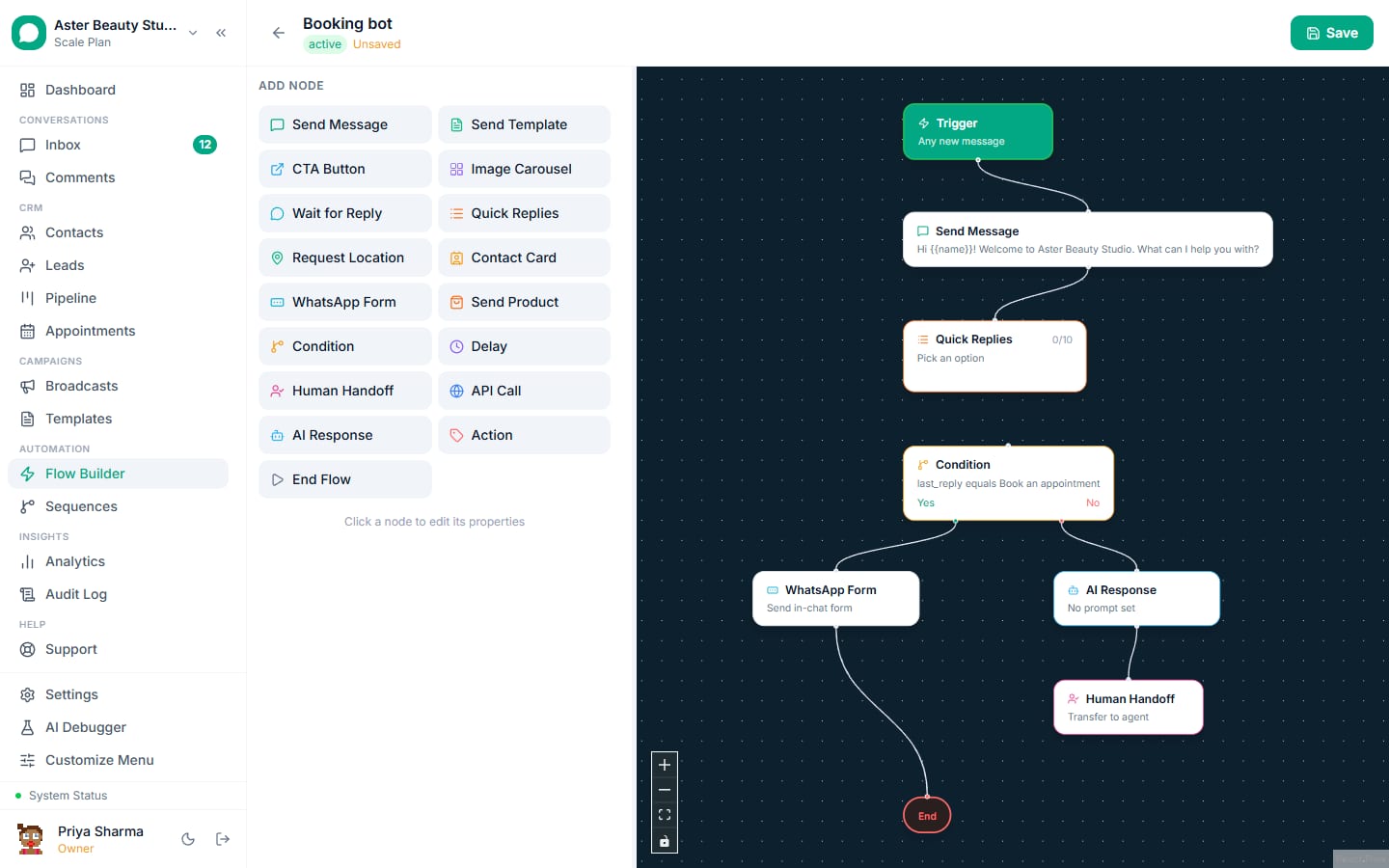
Flows (flow builder): a drawn conversation with branches, questions, delays and handoff. Menus, lead qualification, bookings, order status, data collection. The core of a chatbot.
AI chatbot (AI chatbot): answers from a knowledge base (price list, FAQs, policies, brochures) when the customer asks something the flow did not script, with escalation rules and an automatic pause when a human replies. Add it once the flow exists; it fills the gaps rather than replacing the structure.
Five bots worth building first
- The FAQ bot. A menu of the six questions that are most of your enquiries, each answered with a short message and a "Talk to a person" button. Contains 40 to 80 percent of inbound volume for most service businesses.
- The lead qualifier. Three questions (what do you need, when, budget or size) saved to the lead record, then assigned to the right agent with a summary. Ads and website chats feed it.
- The booking bot. Service, date and slot chosen from lists or a WhatsApp Flow form, confirmed with a utility template, reminded the day before.
- The order status bot. "Where is my order" answered from the order number via a webhook or a saved field.
- The after-hours bot. Outside working hours: acknowledge, answer the FAQ menu, collect name and need, promise a reply by a time, create the lead.
Build the first flow in 30 minutes
The example is a salon FAQ and booking bot; swap the words for your business.
Step 1: the trigger
Flow Builder, New Flow, name it "Welcome and menu". Trigger: any first message from a new contact, plus keywords "hi", "hello", "menu", "price". Keep other flows on distinct keywords so they never compete.
Step 2: the welcome message with buttons
Add a Send Message node: "Hi, this is Aster Beauty Studio. What can we help with?" with three reply buttons: Prices, Book, Talk to us. Three is WhatsApp's button limit; use a list message for up to ten options.
Step 3: one branch per button
- Prices: a Send Message node with the price list as a document or a short text, then a button "Book now" that joins the Book branch, and "Talk to us".
- Book: a Question node "Which service?" with a list (Haircut, Colour, Facial, Manicure), saving the answer to a contact field; a second Question "Which day works?"; then a Send Message confirming a person will confirm the slot, and an Assign node to the front desk. If you use appointments, a WhatsApp Flow form node collects service, date and slot in one screen.
- Talk to us: an Assign node to the team, with a message "Connecting you to a person. We reply within a few minutes during 10 am to 8 pm."
Step 4: the fallback
Add a fallback for typed text that matches nothing: "I did not catch that. Tap a button below, or reply TALK for a person." Loop back to the menu once, then hand over. Two fallbacks in a row means a human should take it.
Step 5: activate and test
Set the flow to active and message your own connected number with "hi". Tap through every branch. Check that the contact fields saved, the assignment landed in the inbox with the flow context, and the AI debugger shows no errors. Fix, retest, done.
Step 6: connect the sources
Point the website chat widget, the click-to-WhatsApp ad and the QR code at the same number; the welcome flow greets all of them. Tag the source on the contact so you can compare later.
Adding AI without losing control
Turn on the AI chatbot once the flow works. Upload the price list, FAQs, policies and a brochure as the knowledge base; write the fallback message; set escalation rules (words like "refund", "complaint", "manager"; low-confidence answers; a request for a person). The AI answers open questions inside the flow's structure, waits for the customer to finish typing before replying, and pauses itself the moment a person replies in the thread. Review its answers in the AI debugger for the first week and add the missing facts to the knowledge base rather than editing prompts.
Example
Customer: "Do you do bridal packages and what do they include?" Flow has no bridal branch. AI answers from the brochure: package contents, price range, and offers the Book button. Customer: "Can I speak to someone about a trial?" AI escalates: assigned to the desk with the transcript.
What it costs
A chatbot that answers inbound enquiries therefore costs nothing per message at Meta. The reminder it sends the next day is a utility template (Rs 0.115 in India). Platform: VGraple CRM's flow builder and automation rules are on the free plan; the AI chatbot is on Growth and above, or bring your own model key.
Measuring the bot
| Metric | Healthy | Meaning |
|---|---|---|
| Containment | 40 to 80 percent | Conversations resolved without a human |
| Handoff rate | 20 to 50 percent | The rest; they should arrive with context |
| Time to first reply | Under 5 seconds | The bot's, not the human's |
| Fallback rate | Under 15 percent | Typed messages the flow did not understand |
| Leads created | Depends | The qualifier's output |
| Bookings confirmed | Depends | The booking bot's output |
Read 20 conversations a week. Every fallback is a branch you should add or a fact the AI is missing.
Mistakes that make customers leave
- No human path on the menu. Put "Talk to us" on every screen.
- Loops. Two fallbacks in a row means hand over.
- Walls of text. One idea per message; buttons over paragraphs.
- Asking for what you already know. Use the contact's name and past answers.
- Bot keeps talking after a human joins. The AI must pause on human reply (VGraple CRM does this automatically).
- Building the bot before the opt-in and templates exist. The bot replies to inbound; outbound follow-ups still need templates and consent.
Industry starting points
- Clinics: appointment booking, report status, pre-procedure instructions, after-hours triage with an emergency number.
- Coaching: batch details by class and subject, fee structure, counsellor callback.
- Real estate: configuration and budget qualification, site-visit booking, brochure by project.
- D2C: order status by order number, size guide, returns policy, back-in-stock waitlist.
- Restaurants: menu, table reservation, delivery order collection.
- Travel: destination, dates, travellers, budget; then a human quotes.
More in WhatsApp chatbot use cases for Indian businesses.
What VGraple CRM does here
The flow builder (triggers, messages with buttons and lists, questions that save fields, branches, delays, templates, WhatsApp Flow forms, assignment and handoff), automation rules and the inbox with flow context are on the free plan. The AI chatbot with a knowledge base, escalation rules, typing debounce and automatic pause on human reply is on Growth and above. The AI debugger shows every decision, and the sandbox number lets you test before connecting your own.