On this page
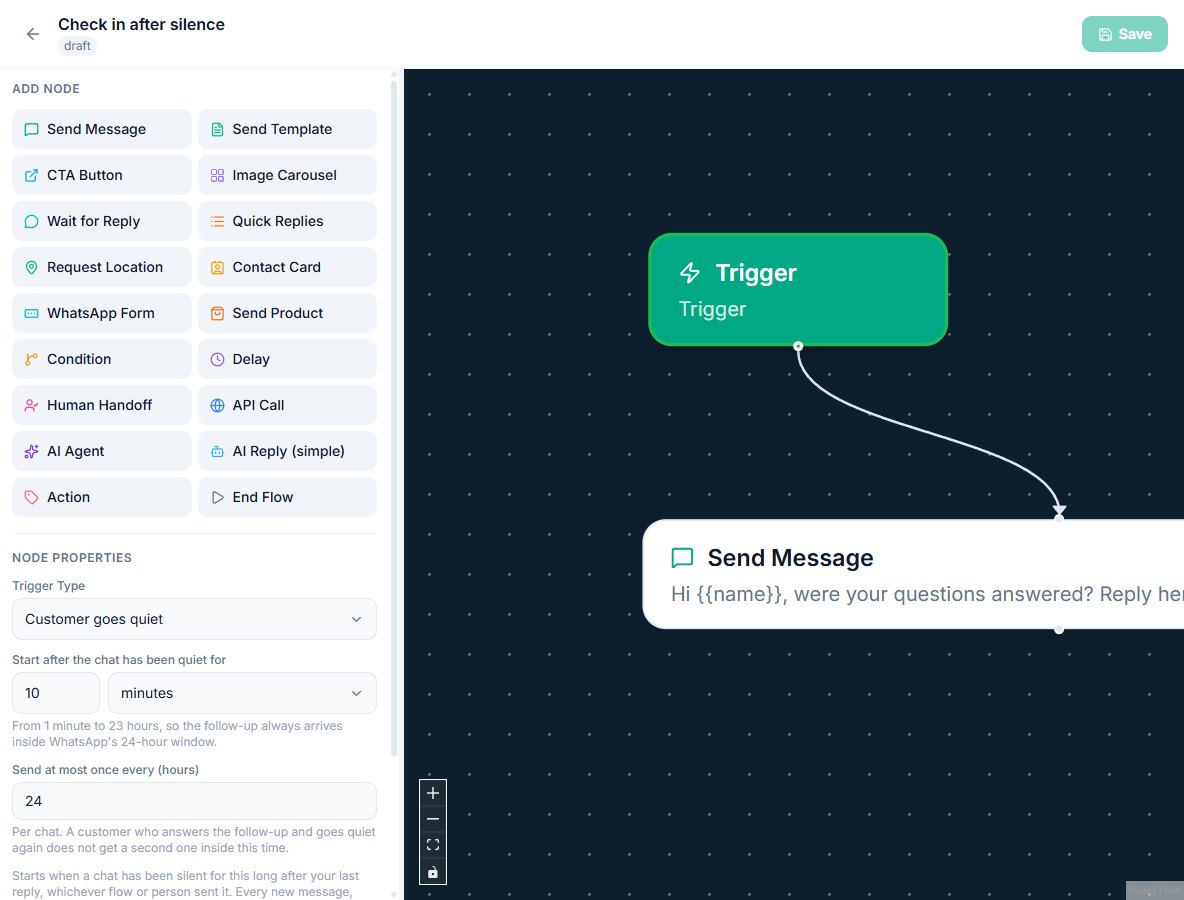
The Customer goes quiet trigger starts a flow when a WhatsApp chat has been silent for a time you choose, after the customer has been answered. Use it to ask "Were your questions answered?" once, about ten minutes after the conversation stops, however many keyword flows replied before it.
Follow up on silence: first 5 of 7 steps
- 1Create a new flow
- 2Choose the trigger
- 3Set the quiet time
- 4Set the cap
- 5Add the follow-up message
Before you start
- The trigger is part of the Flow Builder and is included on every plan, including Free. It needs no AI and no add-on.
- You need permission to edit flows, and at least one connected WhatsApp number.
- The follow-up is a free-form reply, so it goes out inside WhatsApp's 24-hour customer service window. That is why the quiet time stops at 23 hours. From 1 October 2026 Meta charges for replies too; the first 1,000 each month on each WhatsApp number are free.
- Decide where the follow-up lives. It belongs in one flow of its own. If your keyword flows each end with their own "anything else?" message, remove those, or the customer gets both.
Steps
- Create a new flow. Open Flow Builder, type a name such as "Check in after silence" and click New Flow.
- Choose the trigger. Click the green Trigger node, open Trigger Type and pick Customer goes quiet, under Messaging.
- Set the quiet time. In "Start after the chat has been quiet for", enter a number and pick minutes or hours. Ten minutes suits a support bot; an hour or two suits a sales enquiry where people compare options before they answer.
- Set the cap. "Send at most once every (hours)" is 24 by default, which means one follow-up per chat per day. Raise it if a weekly check-in is enough; lower it only if you want the flow to run again the same day.
- Add the follow-up message. Drag a Send Message node under the trigger and write the question. To give the customer buttons, use Quick Replies with options such as "Yes, thanks" and "I need more help", and connect each button to what should happen next.
- Save and activate. Click Save, then switch the flow on from the flow list. If another active flow already uses this trigger on the same number, you are told so when you switch it on, because each would send its own message.
- Test it. Message your number with one of your keywords, let the keyword flow answer, then leave the chat alone. The follow-up arrives within about a minute of the quiet time you set.
Example
A wholesale clothing store runs keyword flows for "price", "delivery" and "returns". A customer asks about delivery, then returns, then stops. Ten minutes after the last answer, one message asks whether everything was covered, with a button to reach a person. Before this trigger each of the two flows would have needed its own delayed follow-up, and the customer would have received two.
What you will see
The follow-up appears in the chat like any other flow message, and the flow's run count goes up by one on the flow list. The timer is counted from the last message in the chat in either direction, so it restarts when the customer writes again and when a flow replies. A customer who sends five questions over twenty minutes gets one follow-up, ten minutes after the last answer.
The trigger is checked every minute, so a 10 minute quiet time means the message arrives between 10 and 11 minutes after the last message. If the customer answers the follow-up and then goes quiet again, no second follow-up is sent until the "Send at most once every" time has passed.
When the follow-up does not start
The trigger is deliberately careful. It does not start when:
- A person is handling the chat. A reply from a team member pauses automation on that chat (see the takeover pause). The trigger waits until the chat is resolved or automation is resumed.
- The customer's last message is unanswered. If nothing replied, asking whether their questions were answered would be wrong. The last message in the chat has to be one you sent, and it has to have gone out.
- Another flow is waiting on a Delay step. That flow's next message restarts the timer, so the follow-up comes after it instead of in the middle.
- The chat is resolved or snoozed, or the contact has opted out or is blocked.
- The last message was a template broadcast. A campaign is not an answer to a question, so it does not count as a reply.
- The flow is not switched on for that number. In a workspace with several numbers, the trigger follows the flow's "Runs on" setting.
Settings and options
| Setting | What it does | Default |
|---|---|---|
| Start after the chat has been quiet for | How long nothing may be sent or received before the flow starts. 1 minute to 23 hours, in minutes or hours | 10 minutes |
| Send at most once every (hours) | The least time between two runs of this flow in the same chat. 1 to 720 hours | 24 hours |
| Runs on | Which WhatsApp numbers the flow follows up on, when the workspace has more than one | All numbers |
| Wait for Reply: Stop waiting after | In the follow-up flow itself, how long to wait for an answer before the No reply path runs. 1 minute to 72 hours | 24 hours |
Close the chat when nobody answers
A common second step is to tidy up after a follow-up that gets no answer:
- After the follow-up message, add a Wait for Reply node and set "Stop waiting after" to, say, 0 hours and 30 minutes.
- Connect the Reply handle to a thank-you message, or to a human handoff if the customer asks for more help.
- Connect the grey No reply handle to a short closing message, then to an Action node set to resolve the conversation.
The chat then leaves the open inbox by itself, and the customer's next message opens it again and starts your keyword flows as usual.
Troubleshooting
| Symptom | Likely cause | Fix |
|---|---|---|
| No follow-up arrived after the quiet time | A team member replied in the chat, so automation is paused there | Look for the Paused chip in the inbox header; resume automation or resolve the chat |
| No follow-up, and no person replied | The customer's last message had no reply, or the reply failed to send | Check the chat: the last message must be an outgoing one that was delivered |
| The customer received two follow-ups | Two active flows use the Customer goes quiet trigger on the same number, or a keyword flow still has its own delayed follow-up | Keep one flow with this trigger, and remove Delay follow-ups from keyword flows |
| The follow-up arrived once and never again for that customer | The "Send at most once every" time has not passed, or the customer has not written since | This is the cap working; lower the hours if you want it to run more often |
| The follow-up came a minute late | The trigger is checked once a minute | Expected; allow up to a minute beyond the quiet time |
Related reading
See flow triggers for every other way a flow can start, the flow node reference for Wait for Reply and the other steps, and the Flow Builder guide for building and testing a flow from scratch.