On this page
Ads Studio builds Click-to-WhatsApp ads on your own Meta ad account from inside VGraple CRM, then shows Meta's figures next to the chats, leads and revenue each ad brought in. This walkthrough covers connecting Meta Ads, the six steps of the wizard, checking with Meta, publishing, and changing an ad afterwards.
Ads Studio: first 5 of 8 steps
- 1Connect Meta Ads
- 2Open WhatsApp Ads and start a campaign
- 3Goal
- 4Audience
- 5Budget & delivery
Before you start
- Ads Studio is on the Growth plan and above. Owners and Admins can create and manage ads; Supervisors can view them.
- The workspace owner connects Meta Ads. You need a Facebook Page and a Meta ad account you manage, with a payment method on the ad account.
- The WhatsApp number the ad opens must be connected in VGraple CRM and linked to the Page in Meta, under Page settings, WhatsApp.
- Purchases and leads go back to Meta while Meta Conversion Tracking is on, which it is unless someone switched it off; see setting up Meta Conversions API.
- Decide where people from the ad should go: a flow to answer them, a pipeline for their lead, a tag and an agent. See flow triggers and pipelines and stages.
Steps
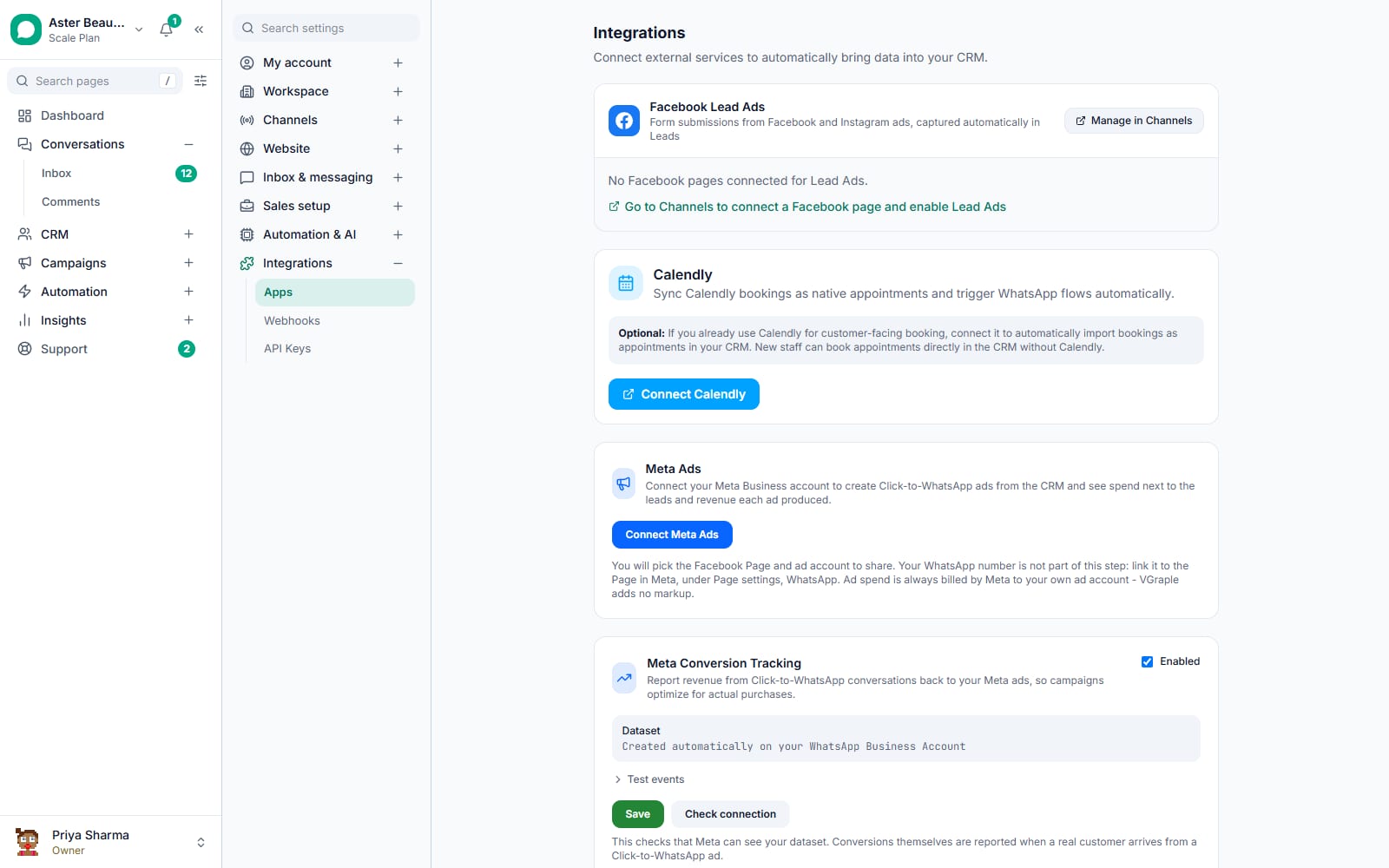
Connect Meta Ads. Go to Settings, then Integrations, then Apps, and click Connect Meta Ads on the Meta Ads card. In Meta's window, pick the Facebook Page and the ad account to share. Back in the card, each ad account is listed with its health in a short label, such as Payment failed, grace period, and, when something needs doing, the next step with a link to Meta; pick the default for new campaigns. Sync reads them again, and Daily budget cap sets the highest daily budget a campaign may be given, in the default ad account's currency (the field reads, for example, Daily budget cap in INR). Meta can still spend somewhat more than the daily budget on some days.
Open WhatsApp Ads and start a campaign. WhatsApp Ads in the sidebar opens Ads Studio, with the tabs Campaigns, Audiences, Rules and Ad performance. Click New campaign. The wizard shows Step 1 of 6 and saves a draft as you go; Discard draft removes it. At each step, Next first checks your settings against Meta's rules. If Meta would refuse one, the wizard names the rule and the setting in plain words and stays on that step until you change it.
Goal. Name the campaign and pick what the ad should get you: Leads (right for almost every WhatsApp ad), Sales, Engagement or Traffic, then the performance goal. Add a Campaign spending limit if the campaign must never spend more than a set total. The hint under the field gives Meta's smallest limit, INR 5,000 on an INR ad account, and Next refuses a lower amount; for other currencies, Check with Meta reports Meta's figure. Tick any Special ad categories the ad is about; Meta requires an honest declaration.
Audience. Add locations (countries, states, cities with a radius, areas, PIN codes or a map pin), age, gender, detailed targeting and languages. Include or exclude saved audiences, such as one built from your contacts on the Audiences tab. Leave Advantage+ audience on to let Meta reach beyond your selection. Estimated audience size shows Meta's estimate. Two of Meta's rules apply here. With Advantage+ audience on, the minimum age must be between 18 and 25 and the maximum age 65. With a special ad category, every city and map pin needs a radius of at least 17 km: a city added after you tick a special ad category gets 17 km on its own (set one on any city added before), a map pin starts at 25 km, and Next refuses any city or pin under 17 km.
Budget & delivery. Choose a daily or total budget. Meta's minimum for your ad account shows under the amount (for a total budget, that daily minimum times the days it runs), and so does the workspace cap if the owner set one, which applies to daily budgets only. Set the start and an end, the cost control, and placements: Advantage+ (automatic) or Manual. A total budget can also run on set days and hours with Add a time window.
- Cost control is Automatic (lowest cost), Bid cap or Cost cap per result. With the conversations or impressions performance goal, Meta allows no cost cap, so only a bid cap is offered and the wizard says why.
- Under Manual, Meta shows some positions only beside another one, and ticking such a position ticks the one it needs. Facebook Stories needs Facebook Feed or Instagram Stories (the wizard ticks Facebook Feed). Ads on Facebook Reels, in-stream video, Marketplace, the right column, Facebook search results, the Facebook profile feed, notifications and both Audience Network positions need Facebook Feed. Explore, the Instagram profile feed and the Threads feed need Instagram Feed, Explore home needs Explore, and WhatsApp Status needs Instagram Stories. When a choice breaks one of these rules, the wizard names it under the placement boxes.
- When the ad can run on WhatsApp Status, on Advantage+ placements or with Status ticked, the wizard warns that a chat started there arrives without a click ID, so it cannot be reported to Meta, though the chat, its lead and its revenue still count here. Choose Manual and leave Status unticked to keep it out.
- Each time window starts and ends on the hour and lasts at least an hour.
Creative. Pick Image, Video or Carousel, upload the media, and write the primary text, headline and description, and choose the Instagram account the ad runs under. Under More ads in this ad set, drop several images and videos to make one ad from each, all sharing the budget.
WhatsApp. Pick the Facebook Page and the WhatsApp number the ad opens, then write the Greeting shown when the chat opens (up to 300 characters, Meta's limit), with an optional image above it. On the Engagement goal, What opens after the tap can be the Greeting message or a Call prompt, which invites the person to call you before chatting. Under How should customers start?, pick a Pre-filled message or up to four Question chips, each with an optional instant reply of up to 300 characters. Add an optional button, choose the Automation for replies from this ad, and under When someone messages from this ad, set the tag, the assignee and Open a lead in pipeline.
Review, check and publish. Review lists every setting with Meta's previews of the ad. Click Check with Meta: Meta validates the campaign without creating anything. Meta checks an ad set only inside an existing campaign, and an ad only inside an existing ad set, so each is checked inside one of yours when there is one. The ad set is checked inside a campaign with the same goal and special ad categories that is not archived and has no campaign budget (with a campaign budget, Meta refuses an ad set that carries its own budget, so a campaign set up that way cannot host the check). The ads are checked inside an ad set of the same Page, in a campaign with the same goal and special ad categories, that has not ended and is not archived. The answer says plainly what Meta could not check and why, for example that every ad set of that Page has ended or is archived, and names the placements and devices the ad set it used does not run on, such as "That ad set does not run on Instagram reels, WhatsApp, so Meta did not check the ad there." It reads "Meta accepts the campaign, the ad set and the ad" only when Meta checked everything on every placement you chose. Because the wizard already refuses what Meta refuses, Check with Meta is left with what the wizard cannot know in advance, such as Meta's smallest spending limit in a currency other than INR. Publishing paused shows any remaining problem before anything runs. Then click Publish paused to keep it off until you turn it on, or Publish and activate to start delivery as soon as Meta approves it.
What you will see
The campaign appears in WhatsApp Ads with its delivery state: In review while Meta checks it (an ad published paused reads Paused until it is first read, then In review, off), then Active, Learning, Learning limited, Active with issues, Off, Issues when Meta reports a problem that stops it, Needs payment method, Rejected or Completed. A campaign with several ads is one row; Show the ads lists them underneath, and clicking it opens the campaign page with Meta's figures for the whole campaign and a table of its ads. Each ad's page has the tabs Overview, Breakdowns, Ad previews, Conversations and Settings, plus Edit, Turn off or Turn on, Duplicate and Archive, and a link to the same campaign in Ads Manager.
On the WhatsApp Ads list and on every campaign and ad page, a line under Meta's figures names the attribution window, for example "Results, conversations and Meta purchases count with Meta's 7-day click or 1-day view attribution", and says so when the ads use different windows. The CRM's conversations, leads and revenue sit beside them. The Ad performance tab shows Meta's spend and conversations without that line. When Meta approves an ad you published with Publish and activate, you get an "Ad approved" notification as it starts delivering; an ad published paused shows Off once approved, ready to turn on. If Meta rejects it, limits it or something on the ad account stops it, the page shows why; see ad account health and review alerts.
Automated rules
The Rules tab in WhatsApp Ads watches your Ads Studio campaigns for you. A rule reads "when a figure over a period is above or below a value, then do something", and every rule is checked every 30 minutes against Meta's figures and your CRM's leads.
- When: a figure such as Amount spent, Cost per messaging conversation started, CTR (all), Frequency or Cost per CRM lead, over a period from today to the last 30 days or the campaign's lifetime, compared with your value. Only after (impressions) waits until the campaign has enough impressions to judge.
- Then: turn the campaign off or on, send a notification only, or increase or decrease the daily budget by a percent, with an optional Never above or Never below daily limit.
- Act at most once every (hours) is the cooldown, so a rule does not flip a campaign back and forth, and Notify when it fires tells you each time it acts.
- A rule applies to all campaigns or to the ones you select, and Recent activity lists every time a rule fired and what it did.
Owners and Admins create and edit rules; Supervisors can view them. Rules act only on campaigns built in Ads Studio, never on campaigns built in Ads Manager.
Settings and options
| Setting | What it does | Default |
|---|---|---|
| Campaign spending limit | Meta stops the campaign when its total spend reaches this; you are warned at 80 percent or two days of budget left | No limit |
| Advantage+ audience | Lets Meta reach people beyond your targeting when it predicts better results | On |
| Placements | Advantage+ lets Meta choose; Manual picks Facebook, Instagram, WhatsApp Status, Threads and Audience Network positions | Advantage+ (automatic) |
| Cost control | Automatic, Bid cap, or Cost cap per result (no cost cap with the conversations or impressions goal) | Automatic (lowest cost) |
| Ad scheduling | Runs a total-budget ad only in the time windows you add, on the hour | No windows, runs all day |
| Greeting | The message a person sees when the chat opens, up to 300 characters | Empty |
| Automation for replies from this ad | Starts this flow, ahead of keyword rules, when a chat first comes from this ad. A chat that already came from another ad keeps that ad's setup; to answer every tap on this ad, add a flow with the Chat starts from an ad trigger | None, normal routing |
| Open a lead in pipeline | Opens a lead in the pipeline and stage you pick, once per contact, when a chat first comes from this ad. A chat that already came from another ad keeps that ad's setup | Do not create a lead |
| Daily budget cap (Settings) | No campaign with a daily budget can be created or edited above it, and a daily budget raised above it in Ads Manager raises an alert. A total budget is not checked against it. It is in the default ad account's currency | No cap |
Troubleshooting
| Symptom | Likely cause | Fix |
|---|---|---|
| WhatsApp Ads says Connect Meta Ads to get started | Meta Ads is not connected in this workspace | Ask the owner to click Connect Meta Ads under Settings, Integrations, Apps |
| No pages connected on the WhatsApp step | The Page was not shared when Meta Ads was connected | Connect the Page in Settings, Channels, or reconnect Meta Ads and select it |
| The wizard will not go to the next step, or Check with Meta refuses | Meta does not accept that setting, for example a budget below the ad account's minimum, a spending limit below Meta's minimum, or an age range Advantage+ audience does not allow | The message names the rule and the setting. Change it and continue. A placement that needs another one has it ticked for you |
| The wizard says an option changed since the draft was saved | Meta retired that option, such as the Credit category, or no longer accepts it on a WhatsApp ad, such as the frequency cap | Read the note under Changed since this was saved: a retired category is already swapped for the one Meta names as its replacement, and an option Meta no longer accepts, such as the frequency cap, has been removed |
| Chats from the ad arrive without a click ID | The ad ran on WhatsApp Status, where Meta leaves the click ID out | Expected; choose Manual placements without Status if every chat must be reportable to Meta |
| A banner on the Ads pages says ads stopped | The ad account has a payment, review or limit problem | Follow the banner's next step; see ad account health and review alerts |